Here's the feed URL:
http://th2tran.blogspot.com/feeds/posts/default/-/AppConnector
Showing posts with label AppConnector. Show all posts
Showing posts with label AppConnector. Show all posts
Citrix published apps: no software to install? no problem.
Here's a challenge: You've got 2 web apps, pushed out to client PCs via Citrix as published apps, running side by side on two browser instances. How do you make them talk to each other (i.e. exchange data between the two) without having to modify the 2 apps?
That's the challenge that I was presented today as I was helping a partner build a POC for a prospect. The kicker of it was, I was told one of our biggest competitors was given this challenge and couldn't do it.
Here's the specific scenario that we were able to get implemented within about 3 hours:
And the kicker of it is, there is no AppConnector footprint on the local desktop.
That's the challenge that I was presented today as I was helping a partner build a POC for a prospect. The kicker of it was, I was told one of our biggest competitors was given this challenge and couldn't do it.
Here's the specific scenario that we were able to get implemented within about 3 hours:
- user logs into Citrix web interface.
- user clicks on icon of published app--in this case it was JD Edwards EnterpriseOne web--to launch it.
- user navigates to JDE Supplier Ledger inquiry screen, brings up a supplier number and PO number.
- AppConnector KoolBar appears on the local desktop with a button labeled Get Image.
- User clicks on button, which triggers a search against Imaging system and brings up the scanned invoice image.
And the kicker of it is, there is no AppConnector footprint on the local desktop.

ROI on process automation
I wrote this corny rant on 2-25-2005 but never posted. Upon re-reading, I think it's worth posting.
---
An A/P Clerk, and AppConnector user, called me up this week and happily proclaimed: "yesterday, I did four days' worth of work in one day".
Wow...that's a 400% productivity improvement by using AppConnector simply to automate a multiple data entry process into the single-point data entry process. I did some simple (read: naive) calculations and...say, for an organization staffing 10 accounting clerks working on a $10/hr salary just keying and searching for invoices, in a month's time, the costs incurred would be as follows:
This means that in the short order of a few months, AppConnector would have paid for itself. Pretty good ROI, isn't it?
I said that's a naive calculation because, amongst other things, this productivity gain usually has side benefits such as less data re-keying errors, which, in the first instance, would have incurred more costs of correcting the problem after-the-fact. This benefit results in data consistency across disparate systems. Mind you, that's not to say that AppConnector will totally eliminate data entry errors altogether, because if the error was made in the originating system, it would be replicated in the second system as well when the data is brought over. But then this would be an entirely different problem, not one of re-keying errors.
Back in high school, I did an Economics research paper on process automation and fifth generation computers--the kind of computer systems referred as "expert systems" at the time. This was a time where there were rumbling apprehensions in the labour force about how these great evil things called "computers" would eventually take over the world and put people out of a job because everything would be automated by computers/robots. Anyway, my thesis for the paper was that computers were built to help mankind not to replace it. Any "unskilled" job that they might end up replacing would be an opportunity for people to learn new skills and adapt. This is good for humanity because we don't want to be stuck with the same inefficiency all the time--whether we realize that it is an inefficiency or not--but we should strive to better ourselves each and every day. And isn't that what evolution is all about?
But this was high school, and nearly 20 years ago when I was young(er) and (more) stupid, so what did I know!
Definition: A change that is good is one that benefit you, your organization or, more generally, humanity, in the long run.
When change is good, resistance is futile. Be one with the force (of change, that is)!
---
An A/P Clerk, and AppConnector user, called me up this week and happily proclaimed: "yesterday, I did four days' worth of work in one day".
Wow...that's a 400% productivity improvement by using AppConnector simply to automate a multiple data entry process into the single-point data entry process. I did some simple (read: naive) calculations and...say, for an organization staffing 10 accounting clerks working on a $10/hr salary just keying and searching for invoices, in a month's time, the costs incurred would be as follows:
- no AppConnector: 10 x 8 x 10 x 5 x 4=$16000
- with AppConnector = 16000/4 = $4000, a saving of $12000.
This means that in the short order of a few months, AppConnector would have paid for itself. Pretty good ROI, isn't it?
I said that's a naive calculation because, amongst other things, this productivity gain usually has side benefits such as less data re-keying errors, which, in the first instance, would have incurred more costs of correcting the problem after-the-fact. This benefit results in data consistency across disparate systems. Mind you, that's not to say that AppConnector will totally eliminate data entry errors altogether, because if the error was made in the originating system, it would be replicated in the second system as well when the data is brought over. But then this would be an entirely different problem, not one of re-keying errors.
Back in high school, I did an Economics research paper on process automation and fifth generation computers--the kind of computer systems referred as "expert systems" at the time. This was a time where there were rumbling apprehensions in the labour force about how these great evil things called "computers" would eventually take over the world and put people out of a job because everything would be automated by computers/robots. Anyway, my thesis for the paper was that computers were built to help mankind not to replace it. Any "unskilled" job that they might end up replacing would be an opportunity for people to learn new skills and adapt. This is good for humanity because we don't want to be stuck with the same inefficiency all the time--whether we realize that it is an inefficiency or not--but we should strive to better ourselves each and every day. And isn't that what evolution is all about?
But this was high school, and nearly 20 years ago when I was young(er) and (more) stupid, so what did I know!
Definition: A change that is good is one that benefit you, your organization or, more generally, humanity, in the long run.
When change is good, resistance is futile. Be one with the force (of change, that is)!
AppConnector on Linux?
I've been tinkering a bit with the Gentoo Linux distro, been scouring their documentation site, and I bumped into something interesting. This might make you feel a tiny bit dirty, but apparently you can run IE6 on Linux. So what does this mean? Cross-platform Windows binaries! Wine rocks! Years ago when playing with the earlier Slackware distribution, I got some msdos programs to run in Linux under Wine. But this is way more kewl!
More importantly, it implies that we might be able to get AppConnector running on Linux, too--without a single line of code change! AppConnector uses the MSXML Parser and the MS Scripting Engine which are bundled within IE. So if IE can run on Linux, there's a good chance AC might run on it as well. Imagine the possibilities...being able to mashup KDE and GNOME apps. I've got to try it sometime.
Hmm...I wonder if there's any good MacOS port for Wine.
More importantly, it implies that we might be able to get AppConnector running on Linux, too--without a single line of code change! AppConnector uses the MSXML Parser and the MS Scripting Engine which are bundled within IE. So if IE can run on Linux, there's a good chance AC might run on it as well. Imagine the possibilities...being able to mashup KDE and GNOME apps. I've got to try it sometime.
Hmm...I wonder if there's any good MacOS port for Wine.
Mashing up the desktop?
Hey, have you tried out the new 3.0 release of Google Desktop? I've only begun trying it out for a few days now, but I must say that I really like it. Google Desktop can index everything from individual files, to emails stored within Microsoft Outlook or Mozilla Thunderbird.
This is great! Suddenly, my local hard drives have become one huge database that is easily and quickly searchable using one common interface, and the desktop becoming one integrated application.
From a technical level, I'm intrigued that the Google Desktop Bar is able to:
And then, when I click on the notification popup, it brings up the item in the native application: if it's an Outlook email, GD opens it up in Outlook; new Thunderbird emails get opened using Thunderbird; and new blog entries are brought up in the default browser.
It seems to me that this is an example of what Gavin called "mashing up the desktop".
It also seems to me that AppConnector is well on its way to be considered as a desktop mash-up tool, for the following reasons:
Desktop, the final frontier. These are the voyages of the toolship "AppConnector". Its continuing mission: to explore new desktop environments, to seek out new ways to mash up new desktop applications, to boldly go where no mash-up tool has gone before.
(Star Trek theme music begins...)
And let the mash-up begin.
This is great! Suddenly, my local hard drives have become one huge database that is easily and quickly searchable using one common interface, and the desktop becoming one integrated application.
From a technical level, I'm intrigued that the Google Desktop Bar is able to:
- monitor new emails from my Microsoft Outlook accounts,
- monitor new emails from my Mozilla Thunderbird accounts,
- detect that the web page I'm viewing is a blog page, and monitor that blog for new entries (via its Web Clips feature),
- notify me of new items from all of those sources using one common notification popup interface.
And then, when I click on the notification popup, it brings up the item in the native application: if it's an Outlook email, GD opens it up in Outlook; new Thunderbird emails get opened using Thunderbird; and new blog entries are brought up in the default browser.
It seems to me that this is an example of what Gavin called "mashing up the desktop".
It also seems to me that AppConnector is well on its way to be considered as a desktop mash-up tool, for the following reasons:
- It treats the desktop as one single integrated application.
- It is able to re-use and leverage existing applications' GUI as-is, without the need embellish them into its own GUI, thereby avoiding legal implications involving copyleft, copyright, and what-have-you.
- It mashes up two otherwise disparate functions (e.g. entering A/P invoices and maintaining electronic copies of PO's), normally provided by two different desktop applications, into one integrated (and more complete) solution.
Desktop, the final frontier. These are the voyages of the toolship "AppConnector". Its continuing mission: to explore new desktop environments, to seek out new ways to mash up new desktop applications, to boldly go where no mash-up tool has gone before.
(Star Trek theme music begins...)
And let the mash-up begin.
AppConnector Ranking by Google - Year-End Review
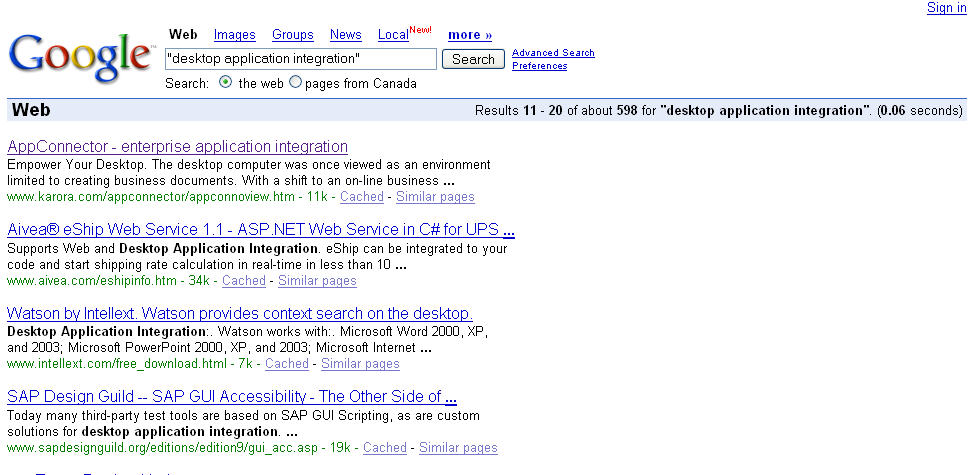
Last year, I observed that Karora AppConnector finally got ranked #1 by the Google search engine for the "appconnector" search word, and suggested that we set our next goal to be ranked #1 for the phrase "desktop application integration".
Well as you all know, over the past year, our marketing engine has been cranking hard ;-), and now it's that time again. Let's see how we faired:

View Full Image.
Eleventh place!
Not quite the #1 billing we had hoped for, but not too shabby either, a vast improvement over last year's ranking for the same phrase. Woohoo!!!
Well as you all know, over the past year, our marketing engine has been cranking hard ;-), and now it's that time again. Let's see how we faired:
View Full Image.
Eleventh place!
Not quite the #1 billing we had hoped for, but not too shabby either, a vast improvement over last year's ranking for the same phrase. Woohoo!!!
AppConnector Cookbook: A Spam Flood Notifier
End-user Problem Statement:
You're an IT Director. Your mail server runs on Windows 2000 and uses a directory to queue incoming messages. You want to be notified as soon as this queue becomes heavily loaded, by excessive spamming for instance, so that you can take the appropriate action in time to avoid mail delays for your users.
Motivation:
I'm that "IT Director"! 8-|
I got up this morning and found that my mail server has been so heavily bombarded by excessive spams for the last 12 hours that our SpamAssassin filter was fuming, and there were in excess of 2000 messages stuck in the queue, and the number was rising. All hell broke loose! It took me three hours to stabilize the spam filter and clear out the message queue.
A couple times a year, we tend to run into little fiascos like these. Alas, with each problem comes opportunity.
Techie Translation of Problem Statement:
Need a utility that lets grumpie here monitor a directory for changes, and it should email him when a directory content has exceeded a certain maximum number of files (say 1000).
Solution:
I don't know if Windoze server provides any built-in way to do what's required, but as the old adage goes: Stick with what you know. So here goes...
Use AppConnector with the following recipe:
Ingredients:
- 1 Default Adapter
- 1 File Monitor event
- 1 Script task, with 1 input parameter
- 1 Mail Task
- some angel dust
Instructions:
Test well before serving.
You're an IT Director. Your mail server runs on Windows 2000 and uses a directory to queue incoming messages. You want to be notified as soon as this queue becomes heavily loaded, by excessive spamming for instance, so that you can take the appropriate action in time to avoid mail delays for your users.
Motivation:
I'm that "IT Director"! 8-|
I got up this morning and found that my mail server has been so heavily bombarded by excessive spams for the last 12 hours that our SpamAssassin filter was fuming, and there were in excess of 2000 messages stuck in the queue, and the number was rising. All hell broke loose! It took me three hours to stabilize the spam filter and clear out the message queue.
A couple times a year, we tend to run into little fiascos like these. Alas, with each problem comes opportunity.
Techie Translation of Problem Statement:
Need a utility that lets grumpie here monitor a directory for changes, and it should email him when a directory content has exceeded a certain maximum number of files (say 1000).
Solution:
I don't know if Windoze server provides any built-in way to do what's required, but as the old adage goes: Stick with what you know. So here goes...
Use AppConnector with the following recipe:
Ingredients:
- 1 Default Adapter
- 1 File Monitor event
- 1 Script task, with 1 input parameter
- 1 Mail Task
- some angel dust
Instructions:
- Start warming an empty KAP in 23C temperature environment for comfort
- Add new application using Default Adapter
- Add Script Task, sprinkle in 1 input parameter for flavour.
- Add File Monitor event, set monitored directory to be the mail queue directory, notification type to ONLY ADDED FILES, and let it simmer.
- Back to Script task, add a couple of lines of script to check number of files in the the directory. Set script so that if this number is below the set limit, it should FAIL. Otherwise, it should SUCCEED, to allow the successor task to run.
- Add Mail task as a successor of Script task. Configure it to send email to IT director with an appropriate message body. Sprinkle in some angel dust for taste and stir well.
Test well before serving.