Weird problem with eMachines DVD-RW drive solved

I've been stumped by this problem with my eMachines M6809 laptop for a couple of years, ever since I first bought the beast. The problem was with the Slimtype SDW-431s DVD-RW drive when run under Windows XP. It would read the contents of the CD/DVD OK, but when I tried to launch a program from it, I'd get an error similar to this:

The procedure entry point blahblahblah could not be located in the dynamic link library blah blah blah.

Notice the weird casing in the procedure name MsgWaitForMultIpleObjects. It should have been MsgWaitForMultipleObjects.

For a long time, I couldn't figure out what the heck that error was about, and had dismissed it as a defective DVD drive and left it at that...At least until this weekend.

Last Friday, at approximately 9:30AM Eastern Standard Time, the hard drive on my lovely eMachine decided to pull a head-crash stunt, sending 5 years worth of my life into /dev/null (a long and painful story for another day), and once again I was motivated to get this damned DVD drive working so that I can do backups with.

This time, I stumbled onto this discussion thread on cdfreaks.com, and figured out what the cause was: it had to do with the Secondary IDE Channel setting used by the DVD device driver on XP. This setting is accessible through the Control Panel Device Manager. By default, the Transfer Mode for Device 0 on this channel property was set to "use DMA if available". I changed it to "use PIO only", and voilĂ ! Everything started working like a charm. Now it can read and run programs off the DVD with no problem.


Prior to finding the solution, I had tried googling like nobody's business, hoping to find some other people who might have experienced similar symptoms, to no avail. So now I thought I'd post my findings here, in hope that it could help some other poor souls out there who might have the misfortune of owning an eMachines laptop and have managed to bump into the same problem.

Mashing up the desktop?

Hey, have you tried out the new 3.0 release of Google Desktop? I've only begun trying it out for a few days now, but I must say that I really like it. Google Desktop can index everything from individual files, to emails stored within Microsoft Outlook or Mozilla Thunderbird.

This is great! Suddenly, my local hard drives have become one huge database that is easily and quickly searchable using one common interface, and the desktop becoming one integrated application.

From a technical level, I'm intrigued that the Google Desktop Bar is able to:

  • monitor new emails from my Microsoft Outlook accounts,
  • monitor new emails from my Mozilla Thunderbird accounts,
  • detect that the web page I'm viewing is a blog page, and monitor that blog for new entries (via its Web Clips feature),
  • notify me of new items from all of those sources using one common notification popup interface.

And then, when I click on the notification popup, it brings up the item in the native application: if it's an Outlook email, GD opens it up in Outlook; new Thunderbird emails get opened using Thunderbird; and new blog entries are brought up in the default browser.

It seems to me that this is an example of what Gavin called "mashing up the desktop".

It also seems to me that AppConnector is well on its way to be considered as a desktop mash-up tool, for the following reasons:

  1. It treats the desktop as one single integrated application.
  2. It is able to re-use and leverage existing applications' GUI as-is, without the need embellish them into its own GUI, thereby avoiding legal implications involving copyleft, copyright, and what-have-you.
  3. It mashes up two otherwise disparate functions (e.g. entering A/P invoices and maintaining electronic copies of PO's), normally provided by two different desktop applications, into one integrated (and more complete) solution.


Desktop, the final frontier. These are the voyages of the toolship "AppConnector". Its continuing mission: to explore new desktop environments, to seek out new ways to mash up new desktop applications, to boldly go where no mash-up tool has gone before.
(Star Trek theme music begins...)

And let the mash-up begin.

Google and China

In the past several weeks, The People's Army of Geeks has slash-dotted the heck out of recent news that Google began censoring searches on google.com.cn.

Give it a break, folks! Google makes it easier for people to access information on the global scale. My prediction: Google's presence is one of the catalysts that will bring about a new kind of cultural revolution, one which will see the end of communism in China without bloodshed.

The voice of democracy cannot be silenced forever. And there will be democracy when the people of China (or Vietnam for that matter) want it so much that their government will have no choice but to give it to them.

REST and the principle of encapsulation

I was playing around with my new Outlook Web Access (OWA) installation last night and it struck me that OWA appears to be a RESTful application. Good on Microsoft!

One of the main concepts in REST is the idea that all resources (in a general sense, not technical sense) in the system are uniquely addressable via a URL. It implies that the URL only contains the business end of the feature (e.g. viewing my inbox) and should have no technology association whatsoever (e.g. this feature was implemented using ASP.NET, which, by the way, OWA was).

In my simple-minded view, I think this encapsulation is very important for the following reasons.

As a (somewhat) alert software user, I couldn't care less if you implemented your software using ASP, ASP.Net, Java, Python, Perl, PHP version 4 as opposed to version 5, or what-have-you. Having a URL containing a tail of .asp, .aspx, .jsp, or .py immediately clues me into what technology you're implementing your software in, which may not be a good thing (see next paragraph). Plus, having technically specific parameters in the URL that has nothing to do with what I'm trying to do, like whether it should use UTF-8 or ISO-8859-1 encoding, is simply annoying.

As a developer, I would want to abstract the underlying implementation language away from my users for many reasons, security being one. If there's a security bug found in the current version of PHP, how do you think the hackers are going to target PHP sites? Yep, you guessed it: crawl the web searchhing for URLs with .php or .php4 extensions. Additionally, if later on, requirements change and it turns out that PHP just can't handle the scalability (sorry for the cheapshot, PHP fans), I can always pull the rug and re-implement the whole system using, oh I don't know, Ruby for instance, and do it without breaking any hyperlink that my users may have bookmarked.

Web URLs should be treated as public interfaces, and if you could change the underlying implementation without changing the interface, that would be ideal.

Accessing your intranet web sites through an SSH tunnel

If, from your home, you're connecting to your company's network via a Linux SSH server, and would like to to be able to access all of the corporate intranet web sites, here's how.

First, some assumptions, your SSH server machine must have the following software installed:

  • an SSH server that support SSH2 protocol
  • SSH daemon running with port-forwarding enabled. RedHat Linux has it enabled out-of-the-box.
  • a web (outbound) proxy/cache daemon. RedHat Linux comes with Squid. Note what port your proxy server is running on. Squid runs on port 3128 by default.


Instructions:
You'll be connecting to the SSH server using PuTTY.

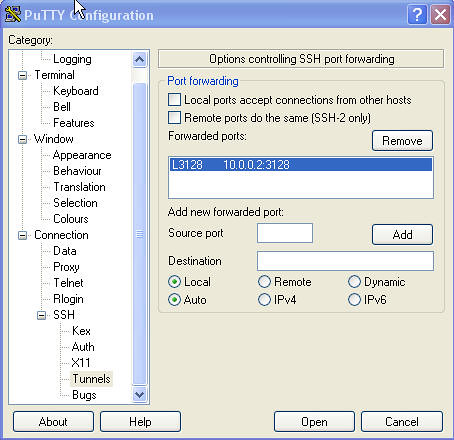
  1. Set up a port-forwarding tunnel as follows: L3128=<your_proxy_server_ip_address>:3128

    View Full Image
  2. Connect to your SSH server using the above new settings
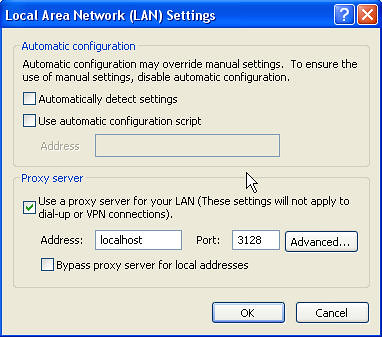
  3. Configure your browser proxy setting to use localhost:3128 as the proxy server.

    View Full Image
  4. Now restart your browser, and try accessing an internal web site, for example: http://shrike.karora.ca:8080/supportwiki/


Internal host names will work, since the browser now uses the DNS server on the proxy server for name resolution. The side effect to this is that you're now surfing the web as if you're doing it from your corporate office's computer. So beware of nosy, sniffy network administrators. ;-)

The whole thing is relatively simple to set up. The one pain point is the tunnel forwarding setup in PuTTY, not too intuitive for the non-techie users.

I've been thinking of writing (if I ever get any down time, that is) a Java Webstart application that does what PuTTY does, but simplifies the setup for the novice users. The administrator would configure the appropriate tunnel setting on the server side, then send a JNLP URL to the user to click on. The JWS application will launch and will take care of all the config stuff. The user won't have to mess with port forwarding settings or browser proxy settings, whatsoever.

If anyone knows anything out there that already does something like this, please let me know.

AppConnector Ranking by Google - Year-End Review

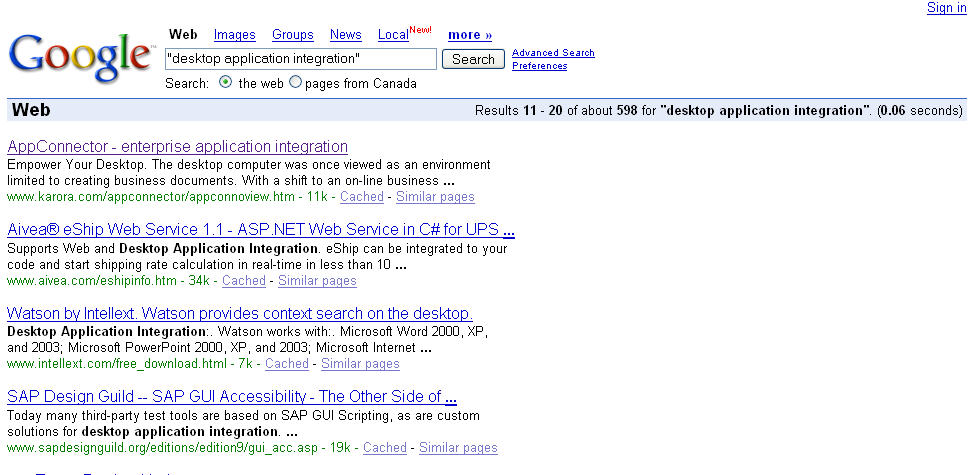
Last year, I observed that Karora AppConnector finally got ranked #1 by the Google search engine for the "appconnector" search word, and suggested that we set our next goal to be ranked #1 for the phrase "desktop application integration".

Well as you all know, over the past year, our marketing engine has been cranking hard ;-), and now it's that time again. Let's see how we faired:
appconn_ranking_2005
View Full Image.

Eleventh place!
Not quite the #1 billing we had hoped for, but not too shabby either, a vast improvement over last year's ranking for the same phrase. Woohoo!!!

Wally

That Wally, so wise!!! :-)


Courtesy: dilbert.com

Heehee, this is sooo true!!! It's also sooo ... me, minus the "existence of [my] wind" part. :-)

"no one" has "seen [me] work" as well. ;-)
And this usually means that I actually get more work done than when some one does "see" me work.

Now you've got to ask yourself one question: Who's this "no one" character?

AppConnector Cookbook: A Spam Flood Notifier

End-user Problem Statement:
You're an IT Director. Your mail server runs on Windows 2000 and uses a directory to queue incoming messages. You want to be notified as soon as this queue becomes heavily loaded, by excessive spamming for instance, so that you can take the appropriate action in time to avoid mail delays for your users.

Motivation:
I'm that "IT Director"! 8-|
I got up this morning and found that my mail server has been so heavily bombarded by excessive spams for the last 12 hours that our SpamAssassin filter was fuming, and there were in excess of 2000 messages stuck in the queue, and the number was rising. All hell broke loose! It took me three hours to stabilize the spam filter and clear out the message queue.

A couple times a year, we tend to run into little fiascos like these. Alas, with each problem comes opportunity.

Techie Translation of Problem Statement:
Need a utility that lets grumpie here monitor a directory for changes, and it should email him when a directory content has exceeded a certain maximum number of files (say 1000).

Solution:
I don't know if Windoze server provides any built-in way to do what's required, but as the old adage goes: Stick with what you know. So here goes...

Use AppConnector with the following recipe:

Ingredients:
- 1 Default Adapter
- 1 File Monitor event
- 1 Script task, with 1 input parameter
- 1 Mail Task
- some angel dust

Instructions:

  1. Start warming an empty KAP in 23C temperature environment for comfort
  2. Add new application using Default Adapter
  3. Add Script Task, sprinkle in 1 input parameter for flavour.
  4. Add File Monitor event, set monitored directory to be the mail queue directory, notification type to ONLY ADDED FILES, and let it simmer.
  5. Back to Script task, add a couple of lines of script to check number of files in the the directory. Set script so that if this number is below the set limit, it should FAIL. Otherwise, it should SUCCEED, to allow the successor task to run.
  6. Add Mail task as a successor of Script task. Configure it to send email to IT director with an appropriate message body. Sprinkle in some angel dust for taste and stir well.


Test well before serving.

Geek jokes, Java flavoured

Just read these jokes on Chet Hasse's Java.Net blog, found them quite ... cute. Thought I'd share them here. You may need to have some programming background to appreciate ...

Two items walk into a ToolBar.
The bartender says, “Can I get you a menu?”
“No thanks, we're looking for a little action.”

...

An item walks into a ToolBar.
The bartender says, “Where's your friend?”
“Big event last night; he's disabled.”

...

Two ints and a Float are in a bar.
They spot an attractive Double on her own.
The first int walks up to her.
“Hey, baby”, he says, “my VM or yours”.
She slaps him and he walks back dejected.
The second int walks over.
“Hey, cute-stuff, can I cook your Beans for breakfast”.
After a quick slapping, he too walks back.
The Float then ambles over casually.
“Were those two primitive types bothering you?”, he remarks.
“Yes. I'm so glad you're here”, she says. “They just had no Class!”


And here are my two cents:

Two items walk into a ToolBar.
Waiter says "Would you like to sit in the menu or non-menu section?"
Item: Non-menu please. Menu section will give us ClassCastException. Can't you see that we're buttons?
Waiter: Oh, I'm sorry. In that case, I can't seat you just yet. Wait here for your ActionListener please. He's busy serving other buttons right now.

Flickr

I just joined the Flickr bandwagon. Here's my very first post :-), taken on my business trip last June using my Canon PowerShot digicam:


Flickr will come in handy the next time I need to include images and illustrations in my blog entries. It is, albeit, a copy-and-paste solution (urgh!) for the time being-- copy the image link from Flickr, paste into Blogger--but it'll do, at least until Blogger finally clues in and supports image uploading in their blogging service. Or is that a premium option? ;-)

Yeah, Yeah, I know Blogger has a thing called Picasa that lets you upload photos. But it's not quite what I'm looking for, because each image uploaded via Picasa immediately shows up as a separate blog entry.

delicious Firefox

Just found this little jem. It's a Firefox extension for del.icio.us. Very kewl!

Custom Development???

Reading Joel's article today on Set Your Priorities, I'm having problem getting past this paragraph:

Custom development is that murky world where a customer tells you what to build, and you say, "are you sure?" and they say yes, and you make an absolutely beautiful spec, and say, "is this what you want?" and they say yes, and you make them sign the spec in indelible ink, nay, blood, and they do, and then you build that thing they signed off on, promptly, precisely and exactly, and they see it and they are horrified and shocked, and you spend the rest of the week reading up on whether your E&O insurance is going to cover the legal fees for the lawsuit you've gotten yourself into or merely the settlement cost. Or, if you're really lucky, the customer will smile wanly and put your code in a drawer and never use it again and never call you back.


I don't get it. Why would doing custom (software) development be any different than any other type of development? Sparky, why the heck did you wait until you finished building the whole darn thing before showing it to your customer? Hint hint: Iterative Development

My First IM spam!

I got this message on Skype today:


Damn spammers!!!
Since when did spamming start spreading onto instant messaging (IM) systems, I wonder.
I also wonder if spamming really work for them. I mean, what rate of response do these spammers get from their unsolicited messages anyway.

Oh well, here comes opportunity for IM spam filter software to bear.

Desktop wars???

Courtesy of Stick Figure Death Theatre:

Google Talk

Has anyone out there tried out the new Google Talk? I need a talk buddy to try this with, to see if the quality is better (or worse) than Skype. You'll need a Google/GMail account in order to use it. I have a google-less-ninety-eight-zero invites left to spare so if you need a GMail account, let me know.

Spammers are an evil breed

So...the net parasites, otherwise known as spammers, have managed to creep into my blog page. Damn them! Damn them all to hell!!!
What's that you said? Cursing them won't help? Oh well, it's a good thing Blogger.com has added CAPTCHAs to their commenting facility. +1

On a side--but somewhat related--note...Gav has recently forwarded to me a link to a CAPTCHA decoder page that claims to being able to defeat many CAPTCHA implementations. We might be able to use similar techniques to improve the screen scraping facility in AppConnector. Too bad, though...No sample code is available yet.

Filming of "The Sentinel" At Sherway Gardens

I walked over to Sherway Gardens for lunch today and was in for a pleasant surprise: they were filming The Sentinel there. One stranger sitting next to me, in the food court, said he saw Michael Douglas (I guess he couldn't contain the excitement and had to tell some body). I missed him by an hour or so. Damn! No more late lunch for me.

Source Code Repository: The Commit Paradox

I shot myself in the foot today, figuratively speaking of course, while struggling with this little subtle dilemma surrounding the rules of code commitment (aka check-in):

  1. To make effective use of a version control system, you should commit your changes often, even if it means committing partially completed features.
  2. As a responsible developer, you should not allow your commit to break the nightly build and regression tests.


I had a piece of enhancement work this morning that I had just finished coding for, but hadn't adequately been tested so I didn't want to commit them to the repository just yet (trying to follow rule #2: don't break the build).

Just then, I realized that there's code duplication in a couple of places. So I decided to do some refactoring. An hour later, a credit of my stunning optimization skills, the code had been nicely refactored. The problem was: the feature enhancement no longer worked! Oops! I must have cut out some vital piece of logic somewhere. The original spaghetti code (that used to work) is now gone--eaten by the refactoring monster.

So in failing to follow rule #1, that set me back by about half a day.

But how can you follow two seemingly paradoxical rules such as ones above? On the one hand, you'd want to commit your changes as often as possible, and not wait until you've fully implemented the feature before committing. On the other hand, you wouldn't want your partial commits to break the automated build and regression tests.

Well, you might say that I should have made a back up of my changes before I start refactoring. Ah hah, but what's the point of a revision control system if you have to keep backups of your changes on the side?

I think the correct solution to this "paradox" would have been to use branching: create a new developmental branch for your enhancement work, even if it was a relatively small enhancement. This would have given me my own sandbox to play with and make partial commits to my heart's content, without breaking the nightly build (because the build would have continued to work on the MAIN branch). And then when I'm satisfied with my implementation, I'd merge the latest changes back into the MAIN branch.

Who needs GoToMyPC ;-)

GoToMyPC lets you access your PC desktop remotely from a web browser, for a fee, of course.

I think here's the next best thing: SSH + Windows XP Remote Desktop Connection. You use your SSH client connection to create a secure tunnel to your Remote Desktop PC. Granted, it's not the same as accessing your desktop through a browser, but...

If you're using Windows XP at home and you have an SSH server running on your home network, chances are you already know how to do this. Go and read more Dilbert--the rest of this article may not apply to you.

If you don't have an SSH server, and want to, install RedHat Fedora.

By default Remote Desktop Sharing is disabled on XP. You'll need to turn it on via the My Computer properties dialog.


In order to set up your tunnel, first, you'll need to download PuTTY, a very well-known SSH client created by Simon Tatham. If you're not familiar with this tool, here's the User Guide.

To create an SSH tunnel through PuTTY is quite simple. From the Tunnels Panel for your connection, add the following mapping:

  • Source Port: 127.0.0.2:3389
  • Destination: <Your RDP computer's IP address>:3389
    e.g. 192.168.2.100:3389
  • Type: Remote


Now, after you've established the SSH session with your server, you should be able to start up your Remote Desktop Connection client and connect to your remote desktop by entering the 127.0.0.2[:3389] in the Destination field (the part in the square brackets are optional). The Remote Desktop Connection client is found on your Start>Program>Accessories>Communications menu, if installed. If you don't have it installed already, you can download it here

For convenience, I usually put a shortcut on my Desktop, pointing to <Path_To_PuTTY_Program_Folder>\plink.exe -load <My SSH Tunnel Session Name> -l <login name>. This allows me to establish the tunnel with one single click. All I need to do after that would be to type in my password, when prompted.
PuTTY configuration screen

PuTTY Tunnel configuration screen

So why 127.0.0.2 instead of localchost [127.0.0.1]? Well, if you're using Windows XP on your local PC and you try to connect your Remote Desktop Client to localhost, you'd get a message by the application saying "I can't connect to myself" (I'm paraphrasing). The 127.0.0.2 IP address tricks the app into thinking that it's actually connecting to a remote computer instead of localhost.

Some of you nerds out there might wonder: why hassle with the SSH tunnel? Why not just connect to RDP directly? Well, I'm of a suspicious mind, and for some strange reason, I feel a little more secure when connecting through a 1024-bit DSA encrypted channel.

You can probably see that SSH tunnelling approach is not only limited to RDP, but can be used to create a secure tunnel into virtually any TCP service on the remote network: NetMeeting, VNC, Exchange Server.

I now have my mind set on my next toy: a wifi PDA running Windows Mobile. This way I can access my office desktop PC everywhere I go.

Usability blooper?

I've installed this piece of software several times before and haven't actually noticed this, but now it strikes me as being quite hilarious.

After I installed this piece of software, it politely asked me whether I wanted to restart the system. I answered "No". It then told me something to the effect of "I'm just going to ignore your 'No' answer, because I know what's good for you. So I'm going to go ahead and reboot your system anyway."

It then proceeded to shutdown my session and rebooted.

Guess which piece of software I'm talking about. :-)

Hint: it's a development tool.

OK. So it's a pretty old piece of software. But still...that's a pretty good usability screw-up, if there is such a thing.