Hosting .NET controls in VB6

I recently ran into a need to interop a C# .NET user control with a VB6 form.

We all know that VB6 only allows you to reference a user control if it resides in an OCX.

The Interop Forms Toolkit, mentioned here, seems to be only good for VB.NET user controls.

Prior to this, I've been able to get by with dynamically adding the control via Controls.Add {COMClassname}, {ControlName}

But now, I need to be able to manipulate the control in design time.

So, based on the above experience, I created a very basic VB6 user control called DotNetControlWrapper. The tricks with this control are the following:

  • There's a public property called DotNetClassName, which is a COM class name of the .NET control.

  • It delegates resizing logic to the .NET control.

  • It exposes the .NET control via a DotNetObject property, thus allowing the user to sync the control's events if needed.


The bulk of DotNetControlWrapper.ctl looks like this:


Option Explicit

Private object As Object
Private ctlExtender As VBControlExtender
Private mstrDotNetClass As String

Public Property Get DotNetClassName() As String
DotNetClassName = mstrDotNetClass
End Property
Public Property Let DotNetClassName(ByVal clsname As String)
mstrDotNetClass = clsname
If mstrDotNetClass = "" Then Exit Property
' initialize the .NET control
If Not ctlExtender Is Nothing Then
Controls.Remove UserControl.Extender.Name + "_dotnet"
End If
Set ctlExtender = Controls.Add(mstrDotNetClass, UserControl.Extender.Name + "_dotnet")
ctlExtender.ZOrder 0
Set object = ctlExtender.object
End Property

Private Sub UserControl_Resize()
If object Is Nothing Then Exit Sub
ctlExtender.Move 0, 0, UserControl.Width, UserControl.Height
object.BringToFront ' Bring the .NET control to foreground
End Sub

Private Sub UserControl_Show()
If ctlExtender Is Nothing Then Exit Sub
ctlExtender.Visible = True
End Sub

Public Property Get DotNetObject() As Object
Set DotNetObject = object
End Property

Private Sub UserControl_Terminate()
If ctlExtender Is Nothing Then Exit Sub
Set ctlExtender = Nothing
object.Dispose
Set object = Nothing
End Sub

Private Sub UserControl_WriteProperties(PropBag As PropertyBag)
PropBag.WriteProperty "DotNetClassName", mstrDotNetClass
PropBag.WriteProperty "Width", UserControl.Width
PropBag.WriteProperty "Height", UserControl.Height
End Sub

Private Sub UserControl_ReadProperties(PropBag As PropertyBag)
On Error Resume Next
DotNetClassName = PropBag.ReadProperty("DotNetClassName")
Width = PropBag.ReadProperty("Width")
Height = PropBag.ReadProperty("Height")
End Sub


Open sauced Jaspersoft?

In the past, I've dabbled a bit with Jaspersoft's reporting engine, back in the days when it was still called Panscopic. I'm just getting back to working with Scope Server now as I'm revisiting an old project, did some checking and it turned out they've open sourced the product since early last year. Subscribed!

I Don’t Care How Your Program Works

Found this from the MSDN Blog: Why Software Sucks. It's an interesting title for a book by Harvard professor David S. Platt. The following snippet from his sample chapter really scratched my "itch":

I Don’t Care How Your Program Works

[A] mistake that programmers make when they design user interfaces is to force users to understand the internal workings of their programs. Instead of the programmer adjusting her user interface to the user’s thought processes, she forces the user to adjust to hers. Furthermore, she’ll usually see nothing wrong with that approach. “That’s how my program works,” she’ll say, puzzled that anyone would even ask the question of why her user interface works the way it does.
...
You shouldn’t have to know or care about her program’s internal workings to use it successfully, as you shouldn’t have to know or care whether your car’s engine uses fuel-injection or a carburetor in order to drive it.


As programmers, we tend to think like....duh...programmers, and often forget to think like users. Being able to make this leap is probably one of the distinguishing factors between a seasoned programmer and a rookie.

Note to Self: stop being a rookie.

Ctrl-Alt-Del via Remote Desktop Connection

Ever wonder how you could issue a Ctrl-Alt-Delete command to your remote desktop connection? Try Ctrl-Alt-End.

Yahoo! Pipes

Got the tip from Gav last night about Yahoo! Pipes and trying to check it out just now.

Too funny! Is it April already?

SSH proxying via Apache

Been working out of a customer site in the past few weeks and their firewall is a bit finicky. One day it would let me ssh into my office fine and the next day it would just kick me out right after the initial handshake. It doesn't actually refuse the connection at the onset. It would connect and then immediately drop the connection. Their IT guys tried to tell me it's my server, not their firewall that was the culprit. Hey, I'm an IT guy too, buddy! (amongst other things). If I can connect fine from my home network and two other guys can also connect from their home, I'm no Sherlock but something tells me it ain't my server. As improbable as it may be, because I know you think your firewall is perfect and that you haven't made any change to it that might cause this. My friend, I'd hate to tell you this but, it's your firewall! ;-)

Right. Next time, you try telling your customer's IT guy that his network firewall is faulty. See if that will get you anywhere.

Oh well. At least this gave me the chance to look into enabling our web server to allow SSH proxying. Found a useful article here: Tunneling SSH over HTTP(S).

This is essentially what you need to add to your httpd.conf on the Appache server:


# HTTP Proxy for SSH
AllowCONNECT 22
ProxyVia On
<ProxyMatch (192.168.1.1)> # Internal IP of your SSH server
Order deny,allow
Deny from all
### External (customer) sites allowed to connect
Allow from 199.243.1.61
Allow from 74.100.102.21
</ProxyMatch>


Then, to connect from the remote site, configure your PuTTY Connection host name to 192.168.1.1 (the internal IP address of your SSH server), set Connection>>Proxy setting to use HTTP proxy, enter in the public hostname and port of your Apache server.
That's it. Painless.

A slight diversion from real work, but this will come in handy the next time I'm at a customer site that blocks out all ports except port 80. I need my network to follow me everywhere I go. I'm effectively crippled without it.

Unless...I wonder, what would happen if the customer's network itself uses a proxy server to get out to the Internet...
Oh well. Not my problem to worry about right now. Will deal with it when I run into it.

Google and YouTube


From YouTube.

This Everly Brothers' song is a classic--brings back old memories of high school nights, sitting by the radio, doing my homework.

It wasn't until today when, by chance, I watched the video clip of this song, that the impact of Google's YouTube acquisition finally hit me: it's so totally consistent with their operational patterns ever since Google's inception in 1998.

In 2001, Google acquired the archives of web based UseNet search service called DejaNews, and as the result, surfers can search UseNet archives dating back to 1981. By the way, my "official" birth date as a netizen is Mon, Jun 21 1993 12:08 pm.

As the world turned, in 2003, Google acquired Pyra Labs, the maker of Blogger.com.

And then now...YouTube.

Microsoft's legacy may have been to make personal computers a common household name. Yahoo's legacy may have been to bring web based email to the consumers. But it may be the case that Google's legacy will be: to preserve memories.

May be I'm giving them all too much undued credits.

Posting from Windows Live Writer

Trying out the new Windows Live Writer Beta, posting to my blogspot blog.  Fingers crossed and hoping that it doesn't mess up my template (I have made a backup, just in case).

I'm liking it.  The user interface for this thing looks pretty simple (I like it simple). Apparently it also supports WordPress, TypePad, and a few others. I'll try it out on WordPress next.

VB Interview Question

This is one of the easy-level questions that I give my interview candidates on the written test part of the interview:

Assume that a and b are Integer variables.

i. If a And b Then Call DoSomething()
ii. If (a And b) = b Then Call DoSomething()

Statements (i) and (ii) are equivalent. True or False?


I thought this was a no-brainer, but apparently not. This is often the source of many bugs in VB code.

So how many of you think the answer is True? ;-)

New Look

I recently tried the WordPress.com service. WordPress, the software, is nice, but the hosted service itself is limiting in that you can't customize the layout template--well you can, but i'll cost you 15 credits to upgrade. Blogger.com, on the other hand gives you full freedom to customize the layout as you'd like--hence the new look of this blog. I was thinking of switching to WordPress, because of the lame layouts that Blogger provides, but having discovered this, I think I'll stick with Blogger for a while longer.

Legend of the Pink Tie

UW Math Faculty's web site has an interesting article about the Pink Tie--an icon for UW mathies.

Back in those frosh days, my pink tie got tie-napped during orientation week by those damned artsies. Lousy TLO! Sign me up for the TG. I want my pink tie back, damn it!
:-)

ActiveLock lives on!

It's been over a year since the time I left the Activelock project, due to lack of time, after having coded the baseline for 2.0. I just checked in to have a quick peek a few days ago, and it looks like it's made great strides since. Kudos to Ismail for doing a great job keeping the project alive.

Back then I had to deal with low-level RSA and MD5 bit mangling in pure C/C++. Granted that much of the encryption code was "borrowed" heavily from the PuTTY project, but, boy, was debugging it ever a nightmare.

If I were to do it all over again now, I'd rewrite the core in .NET--It's sooo much easier now with all the encryption facilities built into the core .NET framework.

I've noticed that every time I do any code weaving in .NET, it seems to take 10 times faster to get things done than doing it the old ways. Suddenly, you're presented with many new possibilities.

How far is that extra mile anyway?

We have all heard of the phrase "going the extra mile" when people talk about providing exceptional service to their customers. And I'm definitely a proponent of this mentality.

However, I've also once heard of the phrase "your lack of planning does not constitute my emergency", murmured by a former colleague when referring to a particularly demanding customer, and also think that it makes perfect sense.

At the office, I sometimes get calls from our partners/resellers with requests of the kind "um...I've got this demo in 2 hours, and I need your help to build this integration against this application that I want to show for my demo."

First thought that always came to my mind was that wonderful phrase uttered by the colleague. I mean, c'mon! My day is usually fully planned out and these kind of things really throw a monkey wrench into things.

My following thought would be, well, they are trying to sell our product for us, and consider the alternative: I tell the partner to blow off and tell the customer to reschedule and give us more time. On such close notice, this would make the partner look very bad in front of the customer, not to mention the partner might have made a long trip onsite for this demo--all of which aren't the end of the world, but a lost opportunity nonetheless.

With that thought, I put my regular schedule aside, got online with the partner and in 2 hours, whipped up a prototype demo into shape, in time for them to show the customer. Everyone was happy...well, except may be me! <whine>You've taken 2 hours of my life on something you could have done yourself, and I want it back!</whine>.

So, although I think that my colleague's "lack of planning" speech is absolutely spot-on--just like the theory of communism is absolutely spot-on--unfortunately, just like communism, it's not very practical ;-)...which brings me to the subject of this blog post: how far is that extra mile? I'll get back to you when I have the answer.

Dead Dog's back

I used to love listening to the The Dead Dog Café on CBC RadioOne every Sunday morning. It had some really witty silliness sketches, done from an aboriginal perspective. I'm not aboriginal (heck, I don't even know if I'm original) but I really enjoyed this show, which was why I really missed it when it suddenly disappeared off the airwaves in 2000.

I tuned into CBC's Sounds Like Canada program on the way to work this morning, and noticed that it's back--I guess after 6 years, somebody at the CBC finally decided to respond to popular demands.

Noice!

Ingenuity: striving to stay ahead of the curve

As we've been struggling a bit in the past several weeks, dealing with the slight inadequacies of some of the less user-friendly third-party SDKs that we've had to work with, I'm reminded of the tale that might help boost some creative mojo's for us all. It's a tale about how we created one of our very first plugins for AppConnector four, five years ago, an exercise that attested to the ingenuity of our research team, of which yours truly had the great honour of being an insignificant contributing member.

We needed to build a plugin to integrate with this other application, but it had no documented API into its user interface (AppConnector is all about integration at the UI level), and the vendor had neither the interest nor the intention of helping us find out. Hmm...Sounds familiar? Anyway, our research team had to study it the hard way, devising various experiments to feed it various inputs and observed its responses to come up with some consistent patterns, and let me tell you, ladies and gentlemen, for a bunch of lowly developers and business analysts, our process was so scientific that we could have claimed a SRED grant for it if we wanted to. It was. ;-)

We did run into some snags, through no faults of our own, however, but rather it was a limitation in their product. I'll never forget the conversation with their support guys when we called. On the phone, we told them that we were trying to do this and this, driving the user interface using that and that, and we expected it to behave this way but it behaved that way, blah, blah, blah, and yadiyadiyada, is this a bug, and can you help? At the end, they said they would talk to their developers and get back to us. What happened right after that was totally hilarious, my product manager and I couldn't stop snickering as we listened. They started talking to each other as if we we had already gotten off the line. (sneaky us!). I'm paraphrasing from this point on as it is quite a few years back, but the jist of volleys were like this:

Guy A: Did you get all that? Did you understand what they're trying to do?
Guy B: Yeah, man, it's totally crazy s**t. Did you know that? What they're doing. Did you know that that can be done?
Guy A: No, man, that's pretty wild.
Guy B: ....
(dialogue continues for at least another minute...eventually)
Guy A: Anyway, let me talk to X and see if we can fix this for them. I'll let you know.


So...We figured out how to use the software in a way that the original creator hadn't conceived. We took it to a new level they didn't think possible. If that's not ingenuity, then I don't know what is.

The moral of the story here is this: we need to remind ourselves, from time to time, that we ARE the experts! People look to us for solutions to the problems, not the other way around--because we do things that they think impossible to achieve, and not because we're a small bunch of super geniuses, but because we invest, painstakingly, our blood and sweat, not to mention countless hours, in figuring out things that are too time consuming for them to do had they attempted to do it themselves. And although it is sometimes unavoidable to need some guidance from our customers/partners, most of the time we are the ones to show them how it's done. As little karoras in our own rights, we all have the creative spirits within us to do that, to make a difference, and to be a part of something of revolutionary potentials.

Recent breakthroughs made by one of the team members this week further convinced me that the feeling is mutual throughout our closed knit group. Kudos, MDM! Go get 'em, maestro!

Microsoft shocks world with Longhorn betas

Hmm...I wonder why the world would be so "shocked", seeing how Vista Beta 2 was at least 6 months overdue. :)

Skype Offers Free Calls to Regular Phones

Yep! It's true. (I just tried it!)
You can now skype out to regular North American phone numbers for free. Well, at least until the end of 2006.

Using the .NET Framework Class Library from Visual Basic 6

I stumbled onto this link while reading another blog. Using .NET framework classes from VB6? Now that's just plain crazy talk!
Or is it?

Freetext Search ≠ Meta Data Search ?

Gav reminded me the other day, when we were discussing the problem of searching, that freetext search does not equal metadata search (also known as field restricted search). Gav was right, of course, as it takes no stretch of the imagination to see that doing a (freetext) search, for documents whose content contains the words "John Doe", is not exactly the same as searching for documents whose Author is "John Doe" (metadata search). The problem with the former is that you may get results back with documents having "John Doe" the Author, as well as "John Doe" the Reviewer.

I claim, however, that metadata search and freetext search are computationally equivalent problems. That is, you can use a freetext search solution to solve the metadata search problem, and conversely, you can use a metadata search solution to solve the freetext search problem. In this post, though, I shall endeavour to prove the first part only, since that is the crux of the original point of discussion.

First, let's do a little bit of review in computational theory. We say that a problem A is reducible to problem B if we can apply a series of transformations that turn problem A into problem B, which, we hope, is less complex and more solveable than problem A. In effect, we're saying that if we could find a solution to problem B, then we would know a solution to problem A as well. It is a common approach that academic researchers like to use when dealing with computational complexity involving NP-complete problems, i.e. problems for which no solution has been found that can be computed in polynomial time. Researchers try to prove that a problem is NP-complete by trying to reduce it to another known NP-complete problem.

Well, I claim that the metadata search problem is reducible to freetext search. Or, in more layman's terms, you can satisfactorily simulate metadata searching using freetext searching capability. And below are the transformations that take the problem from the metadata search domain into the freetext search domain.

Let's say you want to index a PDF document with the metadata field: Invoice_Number = ABC100.
For this document, you provide a secondary file which will serve as the "index file" whose content contains some sort of encoding of the above name-value pair, in addition to the link to the real document. Something like:


<DocumentSummary>
<Invoice_Number>ABC100</Invoice_Number>
<A HREF="file:///C:/Accounting_Data/DOC00000018567.PDF">View Document</A>
<HASHCODE>51E88D049A06D7018D38740772FCAA0A<HASHCODE</CODE>
</DocumentSummary>


where 51E88D049A06D7018D38740772FCAA0A is the computed MD5 hash of the text <Invoice_Number>ABC100</Invoice_Number>.

You will then feed those two files to the freetext indexing engine.

Now then, since the MD5 hash is fairly unique, if I were to do a freetext search for the keyword 51E88D049A06D7018D38740772FCAA0A, it would be highly unlikely that I would get a mixed set of index file and real files in the search result, but rather I would only get a list of index files containing Invoice ABC100, which contained the link to the actual invoice PDF file itself.

Hence, we've proven that we can use a freetext search capability to do metadata search.
QED.

GMail ATOM feeds

Hmm...It seems that Google has been providing ATOM feeds into your GMail inbox for a while now. The question is, then, whether I should trust either of Bloglines or NewsGator enough to give them my GMail ID and password, so that they can fetch the mails for me. :-)

AppConnector on Linux?

I've been tinkering a bit with the Gentoo Linux distro, been scouring their documentation site, and I bumped into something interesting. This might make you feel a tiny bit dirty, but apparently you can run IE6 on Linux. So what does this mean? Cross-platform Windows binaries! Wine rocks! Years ago when playing with the earlier Slackware distribution, I got some msdos programs to run in Linux under Wine. But this is way more kewl!

More importantly, it implies that we might be able to get AppConnector running on Linux, too--without a single line of code change! AppConnector uses the MSXML Parser and the MS Scripting Engine which are bundled within IE. So if IE can run on Linux, there's a good chance AC might run on it as well. Imagine the possibilities...being able to mashup KDE and GNOME apps. I've got to try it sometime.

Hmm...I wonder if there's any good MacOS port for Wine.

HOW NOT TO compute the inverse of a colour

I once wrote a simple VB utility that acted like a window decorator, allowing the user to redact any window on the desktop by highlighting on a rectangular region within it. The highlighting code tracked the user mouse movements and drew the selected region as a hollow rectangle with black border.

My highlighting code had a problem: what if the window you're highlighting had a black background? That would render the highlighting rectangle virtually invisible, wouldn't it?

The code really should have used, for its border colour, the inverse colour of whatever the window's background colour is. OK...How the heck do we compute the inverse colour in VB?

Well, some quick googling yielded this link, which seemed to be somewhat useful:

Take any point in the [RGB] cube, then draw a line from this point to the centroid. If you then extend this line through the centroid the same length as between the original point and the centroid, you will have found the inverse colour to that defined by the original point. Inverting an RGB image involves a kind of turning inside out of the colour values.


uhh, yeah...

So, anyway, I did some more googling, and it turned out that there was a simpler way to do this in VB, thanks to this link.

The trick is in using a PictureBox and the vbInvert constant. The PictureBox will serve as the drawing canvas, onto which a snapshot of the actual window is placed for selection. The following simplified pseudocode illustrates the rest:


' Initializes PictureBox drawing settings
Private Sub Form_Load()
' Set drawmode to draw using the invert of the background colour
Picture1.DrawMode = vbInvert
' Set pen width
Picture1.DrawWidth = 2
...
End Sub
...
...
Private Sub Picture1_MouseDown(Button As Integer, _
Shift As Integer, _
X As Single, _
Y As Single)
If Button <> LEFT Then Exit Sub
LeftDowned = True
' Store [X,Y] as [Left,Top]
...
...
End Sub
...
...
Private Sub Picture1_MouseMove(Button As Integer, _
Shift As Integer, _
X As Single, _
Y As Single)
If Not LeftDowned Then Exit Sub

' Clear previous drawn rectangle
...
' Get current drag region [Top, Left,Bottom,Right]
...
' Draw new rectangle
Picture1.Line (Left, Top)-(Right, Bottom), vbBlack, B
End Sub
...
...
Private Sub Picture1_MouseUp(Button As Integer, _
Shift As Integer, _
X As Single, _
Y As Single)
' Re-set [Left,Top,Right,Bottom] = [0,0,0,0]
...
LeftDowned = False
...
End Sub


The moral of the story is this: There is a simple solution out there somewhere, waiting to be discovered. So keep googling, ya lazy bastard!

Google deleting GMail accounts?

Just caught wind of this news on the blogosphere: some people's GMail account got deleted. Read the full story here and here.

Sounds quite disturbing. This incident might send some users flocking back to the other free mail services. And to think that at one point, I had an idea to build a personal imaging app on top of GMail. It sounded like a good idea at the time.

I never was a big fan of GMail. The lack of foldering capability was the breaker for me. And tagging just ain't the same thing as foldering.

I highly doubt it, though, that Google would actually and purposely delete people's accounts without prior warning. More likely, it's a bug in their system--and a fairly big one, if that indeed turns out to be the case.

Weird problem with eMachines DVD-RW drive solved

I've been stumped by this problem with my eMachines M6809 laptop for a couple of years, ever since I first bought the beast. The problem was with the Slimtype SDW-431s DVD-RW drive when run under Windows XP. It would read the contents of the CD/DVD OK, but when I tried to launch a program from it, I'd get an error similar to this:

The procedure entry point blahblahblah could not be located in the dynamic link library blah blah blah.

Notice the weird casing in the procedure name MsgWaitForMultIpleObjects. It should have been MsgWaitForMultipleObjects.

For a long time, I couldn't figure out what the heck that error was about, and had dismissed it as a defective DVD drive and left it at that...At least until this weekend.

Last Friday, at approximately 9:30AM Eastern Standard Time, the hard drive on my lovely eMachine decided to pull a head-crash stunt, sending 5 years worth of my life into /dev/null (a long and painful story for another day), and once again I was motivated to get this damned DVD drive working so that I can do backups with.

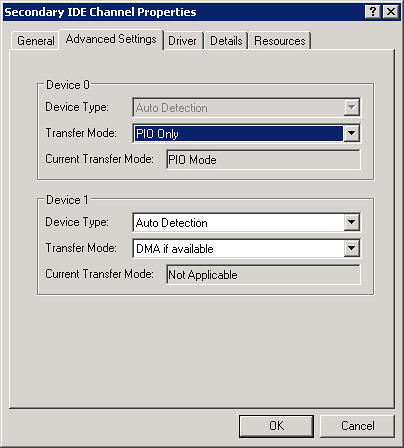
This time, I stumbled onto this discussion thread on cdfreaks.com, and figured out what the cause was: it had to do with the Secondary IDE Channel setting used by the DVD device driver on XP. This setting is accessible through the Control Panel Device Manager. By default, the Transfer Mode for Device 0 on this channel property was set to "use DMA if available". I changed it to "use PIO only", and voilĂ ! Everything started working like a charm. Now it can read and run programs off the DVD with no problem.


Prior to finding the solution, I had tried googling like nobody's business, hoping to find some other people who might have experienced similar symptoms, to no avail. So now I thought I'd post my findings here, in hope that it could help some other poor souls out there who might have the misfortune of owning an eMachines laptop and have managed to bump into the same problem.

Mashing up the desktop?

Hey, have you tried out the new 3.0 release of Google Desktop? I've only begun trying it out for a few days now, but I must say that I really like it. Google Desktop can index everything from individual files, to emails stored within Microsoft Outlook or Mozilla Thunderbird.

This is great! Suddenly, my local hard drives have become one huge database that is easily and quickly searchable using one common interface, and the desktop becoming one integrated application.

From a technical level, I'm intrigued that the Google Desktop Bar is able to:

  • monitor new emails from my Microsoft Outlook accounts,
  • monitor new emails from my Mozilla Thunderbird accounts,
  • detect that the web page I'm viewing is a blog page, and monitor that blog for new entries (via its Web Clips feature),
  • notify me of new items from all of those sources using one common notification popup interface.

And then, when I click on the notification popup, it brings up the item in the native application: if it's an Outlook email, GD opens it up in Outlook; new Thunderbird emails get opened using Thunderbird; and new blog entries are brought up in the default browser.

It seems to me that this is an example of what Gavin called "mashing up the desktop".

It also seems to me that AppConnector is well on its way to be considered as a desktop mash-up tool, for the following reasons:

  1. It treats the desktop as one single integrated application.
  2. It is able to re-use and leverage existing applications' GUI as-is, without the need embellish them into its own GUI, thereby avoiding legal implications involving copyleft, copyright, and what-have-you.
  3. It mashes up two otherwise disparate functions (e.g. entering A/P invoices and maintaining electronic copies of PO's), normally provided by two different desktop applications, into one integrated (and more complete) solution.


Desktop, the final frontier. These are the voyages of the toolship "AppConnector". Its continuing mission: to explore new desktop environments, to seek out new ways to mash up new desktop applications, to boldly go where no mash-up tool has gone before.
(Star Trek theme music begins...)

And let the mash-up begin.

Google and China

In the past several weeks, The People's Army of Geeks has slash-dotted the heck out of recent news that Google began censoring searches on google.com.cn.

Give it a break, folks! Google makes it easier for people to access information on the global scale. My prediction: Google's presence is one of the catalysts that will bring about a new kind of cultural revolution, one which will see the end of communism in China without bloodshed.

The voice of democracy cannot be silenced forever. And there will be democracy when the people of China (or Vietnam for that matter) want it so much that their government will have no choice but to give it to them.

REST and the principle of encapsulation

I was playing around with my new Outlook Web Access (OWA) installation last night and it struck me that OWA appears to be a RESTful application. Good on Microsoft!

One of the main concepts in REST is the idea that all resources (in a general sense, not technical sense) in the system are uniquely addressable via a URL. It implies that the URL only contains the business end of the feature (e.g. viewing my inbox) and should have no technology association whatsoever (e.g. this feature was implemented using ASP.NET, which, by the way, OWA was).

In my simple-minded view, I think this encapsulation is very important for the following reasons.

As a (somewhat) alert software user, I couldn't care less if you implemented your software using ASP, ASP.Net, Java, Python, Perl, PHP version 4 as opposed to version 5, or what-have-you. Having a URL containing a tail of .asp, .aspx, .jsp, or .py immediately clues me into what technology you're implementing your software in, which may not be a good thing (see next paragraph). Plus, having technically specific parameters in the URL that has nothing to do with what I'm trying to do, like whether it should use UTF-8 or ISO-8859-1 encoding, is simply annoying.

As a developer, I would want to abstract the underlying implementation language away from my users for many reasons, security being one. If there's a security bug found in the current version of PHP, how do you think the hackers are going to target PHP sites? Yep, you guessed it: crawl the web searchhing for URLs with .php or .php4 extensions. Additionally, if later on, requirements change and it turns out that PHP just can't handle the scalability (sorry for the cheapshot, PHP fans), I can always pull the rug and re-implement the whole system using, oh I don't know, Ruby for instance, and do it without breaking any hyperlink that my users may have bookmarked.

Web URLs should be treated as public interfaces, and if you could change the underlying implementation without changing the interface, that would be ideal.

Accessing your intranet web sites through an SSH tunnel

If, from your home, you're connecting to your company's network via a Linux SSH server, and would like to to be able to access all of the corporate intranet web sites, here's how.

First, some assumptions, your SSH server machine must have the following software installed:

  • an SSH server that support SSH2 protocol
  • SSH daemon running with port-forwarding enabled. RedHat Linux has it enabled out-of-the-box.
  • a web (outbound) proxy/cache daemon. RedHat Linux comes with Squid. Note what port your proxy server is running on. Squid runs on port 3128 by default.


Instructions:
You'll be connecting to the SSH server using PuTTY.

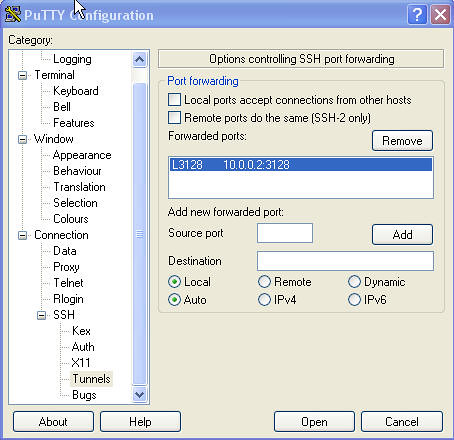
  1. Set up a port-forwarding tunnel as follows: L3128=<your_proxy_server_ip_address>:3128

    View Full Image
  2. Connect to your SSH server using the above new settings
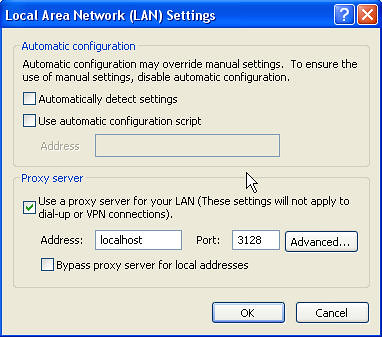
  3. Configure your browser proxy setting to use localhost:3128 as the proxy server.

    View Full Image
  4. Now restart your browser, and try accessing an internal web site, for example: http://shrike.karora.ca:8080/supportwiki/


Internal host names will work, since the browser now uses the DNS server on the proxy server for name resolution. The side effect to this is that you're now surfing the web as if you're doing it from your corporate office's computer. So beware of nosy, sniffy network administrators. ;-)

The whole thing is relatively simple to set up. The one pain point is the tunnel forwarding setup in PuTTY, not too intuitive for the non-techie users.

I've been thinking of writing (if I ever get any down time, that is) a Java Webstart application that does what PuTTY does, but simplifies the setup for the novice users. The administrator would configure the appropriate tunnel setting on the server side, then send a JNLP URL to the user to click on. The JWS application will launch and will take care of all the config stuff. The user won't have to mess with port forwarding settings or browser proxy settings, whatsoever.

If anyone knows anything out there that already does something like this, please let me know.

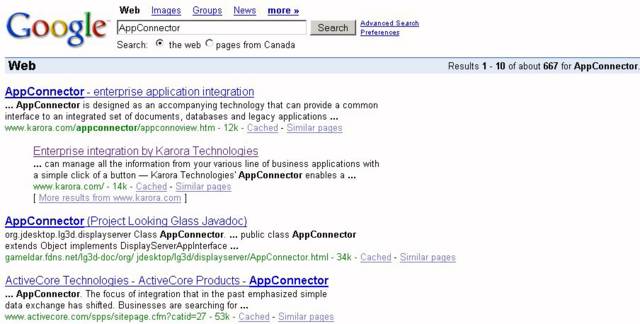
AppConnector Ranking by Google - Year-End Review

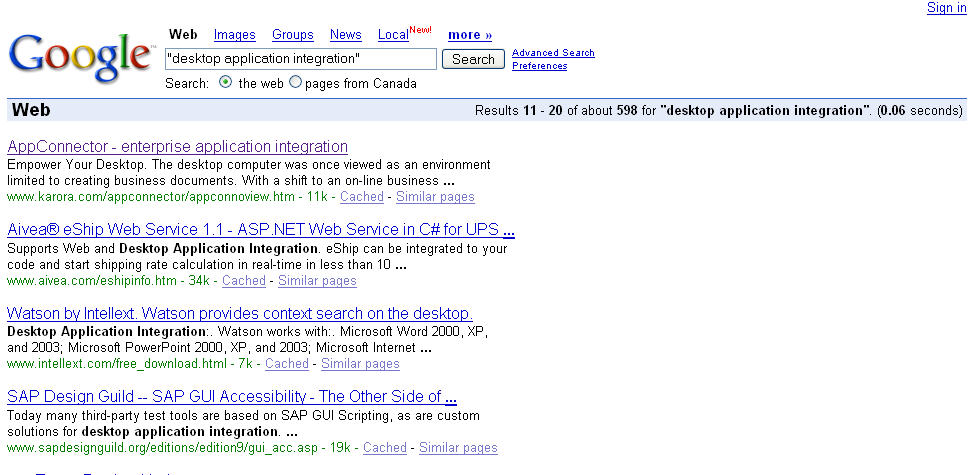
Last year, I observed that Karora AppConnector finally got ranked #1 by the Google search engine for the "appconnector" search word, and suggested that we set our next goal to be ranked #1 for the phrase "desktop application integration".

Well as you all know, over the past year, our marketing engine has been cranking hard ;-), and now it's that time again. Let's see how we faired:
appconn_ranking_2005
View Full Image.

Eleventh place!
Not quite the #1 billing we had hoped for, but not too shabby either, a vast improvement over last year's ranking for the same phrase. Woohoo!!!

Wally

That Wally, so wise!!! :-)


Courtesy: dilbert.com

Heehee, this is sooo true!!! It's also sooo ... me, minus the "existence of [my] wind" part. :-)

"no one" has "seen [me] work" as well. ;-)
And this usually means that I actually get more work done than when some one does "see" me work.

Now you've got to ask yourself one question: Who's this "no one" character?

AppConnector Cookbook: A Spam Flood Notifier

End-user Problem Statement:
You're an IT Director. Your mail server runs on Windows 2000 and uses a directory to queue incoming messages. You want to be notified as soon as this queue becomes heavily loaded, by excessive spamming for instance, so that you can take the appropriate action in time to avoid mail delays for your users.

Motivation:
I'm that "IT Director"! 8-|
I got up this morning and found that my mail server has been so heavily bombarded by excessive spams for the last 12 hours that our SpamAssassin filter was fuming, and there were in excess of 2000 messages stuck in the queue, and the number was rising. All hell broke loose! It took me three hours to stabilize the spam filter and clear out the message queue.

A couple times a year, we tend to run into little fiascos like these. Alas, with each problem comes opportunity.

Techie Translation of Problem Statement:
Need a utility that lets grumpie here monitor a directory for changes, and it should email him when a directory content has exceeded a certain maximum number of files (say 1000).

Solution:
I don't know if Windoze server provides any built-in way to do what's required, but as the old adage goes: Stick with what you know. So here goes...

Use AppConnector with the following recipe:

Ingredients:
- 1 Default Adapter
- 1 File Monitor event
- 1 Script task, with 1 input parameter
- 1 Mail Task
- some angel dust

Instructions:

  1. Start warming an empty KAP in 23C temperature environment for comfort
  2. Add new application using Default Adapter
  3. Add Script Task, sprinkle in 1 input parameter for flavour.
  4. Add File Monitor event, set monitored directory to be the mail queue directory, notification type to ONLY ADDED FILES, and let it simmer.
  5. Back to Script task, add a couple of lines of script to check number of files in the the directory. Set script so that if this number is below the set limit, it should FAIL. Otherwise, it should SUCCEED, to allow the successor task to run.
  6. Add Mail task as a successor of Script task. Configure it to send email to IT director with an appropriate message body. Sprinkle in some angel dust for taste and stir well.


Test well before serving.

Geek jokes, Java flavoured

Just read these jokes on Chet Hasse's Java.Net blog, found them quite ... cute. Thought I'd share them here. You may need to have some programming background to appreciate ...

Two items walk into a ToolBar.
The bartender says, “Can I get you a menu?”
“No thanks, we're looking for a little action.”

...

An item walks into a ToolBar.
The bartender says, “Where's your friend?”
“Big event last night; he's disabled.”

...

Two ints and a Float are in a bar.
They spot an attractive Double on her own.
The first int walks up to her.
“Hey, baby”, he says, “my VM or yours”.
She slaps him and he walks back dejected.
The second int walks over.
“Hey, cute-stuff, can I cook your Beans for breakfast”.
After a quick slapping, he too walks back.
The Float then ambles over casually.
“Were those two primitive types bothering you?”, he remarks.
“Yes. I'm so glad you're here”, she says. “They just had no Class!”


And here are my two cents:

Two items walk into a ToolBar.
Waiter says "Would you like to sit in the menu or non-menu section?"
Item: Non-menu please. Menu section will give us ClassCastException. Can't you see that we're buttons?
Waiter: Oh, I'm sorry. In that case, I can't seat you just yet. Wait here for your ActionListener please. He's busy serving other buttons right now.

Flickr

I just joined the Flickr bandwagon. Here's my very first post :-), taken on my business trip last June using my Canon PowerShot digicam:


Flickr will come in handy the next time I need to include images and illustrations in my blog entries. It is, albeit, a copy-and-paste solution (urgh!) for the time being-- copy the image link from Flickr, paste into Blogger--but it'll do, at least until Blogger finally clues in and supports image uploading in their blogging service. Or is that a premium option? ;-)

Yeah, Yeah, I know Blogger has a thing called Picasa that lets you upload photos. But it's not quite what I'm looking for, because each image uploaded via Picasa immediately shows up as a separate blog entry.

delicious Firefox

Just found this little jem. It's a Firefox extension for del.icio.us. Very kewl!

Custom Development???

Reading Joel's article today on Set Your Priorities, I'm having problem getting past this paragraph:

Custom development is that murky world where a customer tells you what to build, and you say, "are you sure?" and they say yes, and you make an absolutely beautiful spec, and say, "is this what you want?" and they say yes, and you make them sign the spec in indelible ink, nay, blood, and they do, and then you build that thing they signed off on, promptly, precisely and exactly, and they see it and they are horrified and shocked, and you spend the rest of the week reading up on whether your E&O insurance is going to cover the legal fees for the lawsuit you've gotten yourself into or merely the settlement cost. Or, if you're really lucky, the customer will smile wanly and put your code in a drawer and never use it again and never call you back.


I don't get it. Why would doing custom (software) development be any different than any other type of development? Sparky, why the heck did you wait until you finished building the whole darn thing before showing it to your customer? Hint hint: Iterative Development

My First IM spam!

I got this message on Skype today:


Damn spammers!!!
Since when did spamming start spreading onto instant messaging (IM) systems, I wonder.
I also wonder if spamming really work for them. I mean, what rate of response do these spammers get from their unsolicited messages anyway.

Oh well, here comes opportunity for IM spam filter software to bear.

Desktop wars???

Courtesy of Stick Figure Death Theatre:

Google Talk

Has anyone out there tried out the new Google Talk? I need a talk buddy to try this with, to see if the quality is better (or worse) than Skype. You'll need a Google/GMail account in order to use it. I have a google-less-ninety-eight-zero invites left to spare so if you need a GMail account, let me know.

Spammers are an evil breed

So...the net parasites, otherwise known as spammers, have managed to creep into my blog page. Damn them! Damn them all to hell!!!
What's that you said? Cursing them won't help? Oh well, it's a good thing Blogger.com has added CAPTCHAs to their commenting facility. +1

On a side--but somewhat related--note...Gav has recently forwarded to me a link to a CAPTCHA decoder page that claims to being able to defeat many CAPTCHA implementations. We might be able to use similar techniques to improve the screen scraping facility in AppConnector. Too bad, though...No sample code is available yet.

Filming of "The Sentinel" At Sherway Gardens

I walked over to Sherway Gardens for lunch today and was in for a pleasant surprise: they were filming The Sentinel there. One stranger sitting next to me, in the food court, said he saw Michael Douglas (I guess he couldn't contain the excitement and had to tell some body). I missed him by an hour or so. Damn! No more late lunch for me.

Source Code Repository: The Commit Paradox

I shot myself in the foot today, figuratively speaking of course, while struggling with this little subtle dilemma surrounding the rules of code commitment (aka check-in):

  1. To make effective use of a version control system, you should commit your changes often, even if it means committing partially completed features.
  2. As a responsible developer, you should not allow your commit to break the nightly build and regression tests.


I had a piece of enhancement work this morning that I had just finished coding for, but hadn't adequately been tested so I didn't want to commit them to the repository just yet (trying to follow rule #2: don't break the build).

Just then, I realized that there's code duplication in a couple of places. So I decided to do some refactoring. An hour later, a credit of my stunning optimization skills, the code had been nicely refactored. The problem was: the feature enhancement no longer worked! Oops! I must have cut out some vital piece of logic somewhere. The original spaghetti code (that used to work) is now gone--eaten by the refactoring monster.

So in failing to follow rule #1, that set me back by about half a day.

But how can you follow two seemingly paradoxical rules such as ones above? On the one hand, you'd want to commit your changes as often as possible, and not wait until you've fully implemented the feature before committing. On the other hand, you wouldn't want your partial commits to break the automated build and regression tests.

Well, you might say that I should have made a back up of my changes before I start refactoring. Ah hah, but what's the point of a revision control system if you have to keep backups of your changes on the side?

I think the correct solution to this "paradox" would have been to use branching: create a new developmental branch for your enhancement work, even if it was a relatively small enhancement. This would have given me my own sandbox to play with and make partial commits to my heart's content, without breaking the nightly build (because the build would have continued to work on the MAIN branch). And then when I'm satisfied with my implementation, I'd merge the latest changes back into the MAIN branch.

Who needs GoToMyPC ;-)

GoToMyPC lets you access your PC desktop remotely from a web browser, for a fee, of course.

I think here's the next best thing: SSH + Windows XP Remote Desktop Connection. You use your SSH client connection to create a secure tunnel to your Remote Desktop PC. Granted, it's not the same as accessing your desktop through a browser, but...

If you're using Windows XP at home and you have an SSH server running on your home network, chances are you already know how to do this. Go and read more Dilbert--the rest of this article may not apply to you.

If you don't have an SSH server, and want to, install RedHat Fedora.

By default Remote Desktop Sharing is disabled on XP. You'll need to turn it on via the My Computer properties dialog.


In order to set up your tunnel, first, you'll need to download PuTTY, a very well-known SSH client created by Simon Tatham. If you're not familiar with this tool, here's the User Guide.

To create an SSH tunnel through PuTTY is quite simple. From the Tunnels Panel for your connection, add the following mapping:

  • Source Port: 127.0.0.2:3389
  • Destination: <Your RDP computer's IP address>:3389
    e.g. 192.168.2.100:3389
  • Type: Remote


Now, after you've established the SSH session with your server, you should be able to start up your Remote Desktop Connection client and connect to your remote desktop by entering the 127.0.0.2[:3389] in the Destination field (the part in the square brackets are optional). The Remote Desktop Connection client is found on your Start>Program>Accessories>Communications menu, if installed. If you don't have it installed already, you can download it here

For convenience, I usually put a shortcut on my Desktop, pointing to <Path_To_PuTTY_Program_Folder>\plink.exe -load <My SSH Tunnel Session Name> -l <login name>. This allows me to establish the tunnel with one single click. All I need to do after that would be to type in my password, when prompted.
PuTTY configuration screen

PuTTY Tunnel configuration screen

So why 127.0.0.2 instead of localchost [127.0.0.1]? Well, if you're using Windows XP on your local PC and you try to connect your Remote Desktop Client to localhost, you'd get a message by the application saying "I can't connect to myself" (I'm paraphrasing). The 127.0.0.2 IP address tricks the app into thinking that it's actually connecting to a remote computer instead of localhost.

Some of you nerds out there might wonder: why hassle with the SSH tunnel? Why not just connect to RDP directly? Well, I'm of a suspicious mind, and for some strange reason, I feel a little more secure when connecting through a 1024-bit DSA encrypted channel.

You can probably see that SSH tunnelling approach is not only limited to RDP, but can be used to create a secure tunnel into virtually any TCP service on the remote network: NetMeeting, VNC, Exchange Server.

I now have my mind set on my next toy: a wifi PDA running Windows Mobile. This way I can access my office desktop PC everywhere I go.

Usability blooper?

I've installed this piece of software several times before and haven't actually noticed this, but now it strikes me as being quite hilarious.

After I installed this piece of software, it politely asked me whether I wanted to restart the system. I answered "No". It then told me something to the effect of "I'm just going to ignore your 'No' answer, because I know what's good for you. So I'm going to go ahead and reboot your system anyway."

It then proceeded to shutdown my session and rebooted.

Guess which piece of software I'm talking about. :-)

Hint: it's a development tool.

OK. So it's a pretty old piece of software. But still...that's a pretty good usability screw-up, if there is such a thing.

Transferring your Skype settings to another computer

I installed Skype on my new computer and found that my contact list is empty. So...this means Skype keeps my contact list locally instead of keeping it on the central server like MSN Messenger does.
I wanted to transfer all my Skype contacts from my old computer to the new one. It would be nice if Skype provided a Contact List Export/Import feature, but until then, I found this simple hack on their support forum that did just what was needed:

  1. On your old computer, go to the "%USERPROFILE%\Application Data\Skype folder. There you should see a folder with your Skype ID as the name.
  2. Copy that entire folder to your new computer, under the same location. Make sure you shut down Skype before copying, otherwise you'll get some sharing violations.
  3. Start up Skype on the new computer. You may be asked to enter your login information again.
  4. After logging in, you may see that your contact list is empty. Don't panic! Just restart Skype. This time you should see your full "imported" contact list.

The above procedure not only imported the contact list, but also the chat history, call history, the works.

Visual Studio 6 and AMD64?

So after five years, I finally took the chance to upgrade to a (much) more powerful computer. And to add insult to injuries, it's a 64-bit machine (an AMD64 eMachine to be exact), running Windows XP. An aside note of caution: if you're considering putting on Service Pack 2 (SP2) and have no real need for doing it other than wanting to get the latest and greatest, my advice: don't! I found that a couple of my applications just won't run after it. I had to take out SP2, put SP1 back on, and then things ran fine.

Right now, I'm trying to install Visual Studio 6 on the new machine and having a hell of a time. The installer refuses to run, giving weird error messages about missing kernel32.dll entry points. I checked and the entry point is there in the DLL. I have a hunch it might have something to do with the 64-bit thing. I googled everywhere and so far haven't found a solution yet. Perhaps this is a sign to migrate to .NET? ;-)

Firefox 1.0.1

It has begun: Firefox security vulnerabilities are cropping up.


Phishers haven't seem to have paid too much attention because they're too busy hacking away at IE. Or is it because they know it's a geek's browser of choice? And when you touch geek, there's hell to pay. :-) But all this geekosity can only protect us for so long. Being a target is inevitable as the browser gains more popularity.

Interesting to see what the patch rate (turnaround time from discovery to patch availability) will be like for future vulnerabilities, compare to the likes of IE.


Here's a list of vulnerabilities patched in 1.0.1.

Ugrade now!

Why the heck did Sympatico disable SMTP authentication?

OK. I'm really p.o'd about this. I've been a (relatively) happy Sympatico customer in the last four years, but recent development this past week makes me think again (hate it when I do that). I found out that I can no longer send my Sympatico emails from my office using my Thunderbird mail client. A little digging underneath the cover and it turned out they (Sympatico) disabled SMTP authentication on their mail server.

If you don't know what SMTP Authentication is, it just means that the mail server requires you to enter a user name and password when you're sending mails through it. In the case of Sympatico, they've turned it off, which isn't so bad except they've also disabled relaying.

OK. What's "relaying"? It means the server's ability to deliver (relay) your mail message to a server other than itself. So if you're using mail1.com's SMTP mail server to send a message to someone@mail2.com, the server at mail1.com has to "relay" the message to mail2.com for delivery. It's not called "relaying" if I'm using mail1.com's server to send a message to someone_else@mail1.com.

Back to Sympatico. What they've done is made it so that if I'm outside of my home office, I can't send mails! A few emails back and forward with their support staff today and I still couldn't get a straight answer on why they did it. Instead, I was suggested to use their web based GetEmail service. Unacceptable workaround! Reason 1: the user interface is fuuugly! Reason 2: I no longer have control over my Sent Items because they're in two places--the web client and my Thunderbird archive. As a side remark, I never delete any of my legitimate emails. Instead, I archive them, which is why the concept of GMail has some appeals to me.

Now, they must have done it out of some sort of security concerns--I, of all people, should understand that. For a small organization, may be, but for an ISP to use this kind of heavy handed tactics? OK, Someone's been spamming our server, we don't know how to stop the individual spammers, so let's treat them all as spammers! They're all guilty! Let's nuke 'em all.


So thanks, Sympatico. I think I'll switch off that email address from now on and seriously start using my YahooMail or Gmail account, which, by the way, supports POP3 and SMTP.

Hmm...Now that I think about it. Sympatico recently joined forces with MSN, and MSN never did like SMTP. I wonder if this isn't all part of some evil master plan to take over the world.

Look at what they did to me: they've made me senile!

Microsoft's AntiSpyware Tool Removes Internet Explorer?

Just came across this rather amusing article on BBspot.com:

Many Microsoft Windows users who downloaded the recently released AntiSpyware program from Microsoft, or had it installed through an automatic Windows update, woke up to a surprise. Unintentionally, the heuristics of the software detected Internet Explorer as spyware, and removed the program from their systems.


If only it were true....

Two-faced

I started a Vietnamese version of my blog this week, for those readers curious about that other side of me. Now I'm virtually bilingual.

Ease of Use

Lately, I've been making it a personal goal to study/research more on the latest GUI usability trends, in my continuing quest to build more and more intuitive UIs into the softwares that I work with.

I was down at business partner's office this week conducting training, getting their folks up-to-speed on AppConnector. At the end of the session, one of my "students" made a comment which I thought was a really nice compliment. She said "I really like [the fact] that [AppConnector Studio] is so easy to use".

Yes, AppConnector is simple to use, but this was not by accident. We really focused on the non-programmers as our typical user audience. Sure, there's been some mistakes made in the beginning, but when we started version 3.0, our mind set was that someone without any programming knowledge should be able able to pick up and use the product in a day or so, and they should be able to do it in a few simple steps. Creating an integration project should be a matter of configuring a bunch of component properties.

Although there's certainly room for the product to grow in terms of usability and functionality, the person's comment above showed us that we must be doing something right.

Oh the joy of business travel

Well, I'm stuck here at the airport again because of flight delays. If it weren't for the airport's wifi hotspot, I'd be bored to death. Apparently, America West is notorious for delays. I got hit with a three-hour delay on the way in, and this time, looks like it's going to be another red-eye. There is a high probability that it's just me, but I keep bumping into craps like these whenever I travel.

However, to be fair, I've got to say that their service reps are pretty good. What they lack in technical expertise (always some sort of problem with the airplanes--scary), they make up in customer service. On the way in, I got off my initial flight, missed my connection by 1 hour, half expecting to go through hell to try to arrange another connection flight, but there they were, standing at the exit door with my rebooked boarding pass waiting. Now, eventhough it looks like I'll be sleeping on a plane tonight, at least I'll be sleeping in first-class.

You may say that's nothing to write home about--it's to be expected. After all, the delay is their fault. That should be the least they can do. Some people expect alot. On the one hand, I've come to expect nothing from anyone. That way if I get nothing, then there's nothing to be disappointed about. On the other hand, you can argue that since you yourself uphold the best of standards, and, therefore, you should rightly expect--no, demand--the best in return. I'm not entirely sure which is a better character trait to have.

Karora Komics - part 1 Posted by Hello

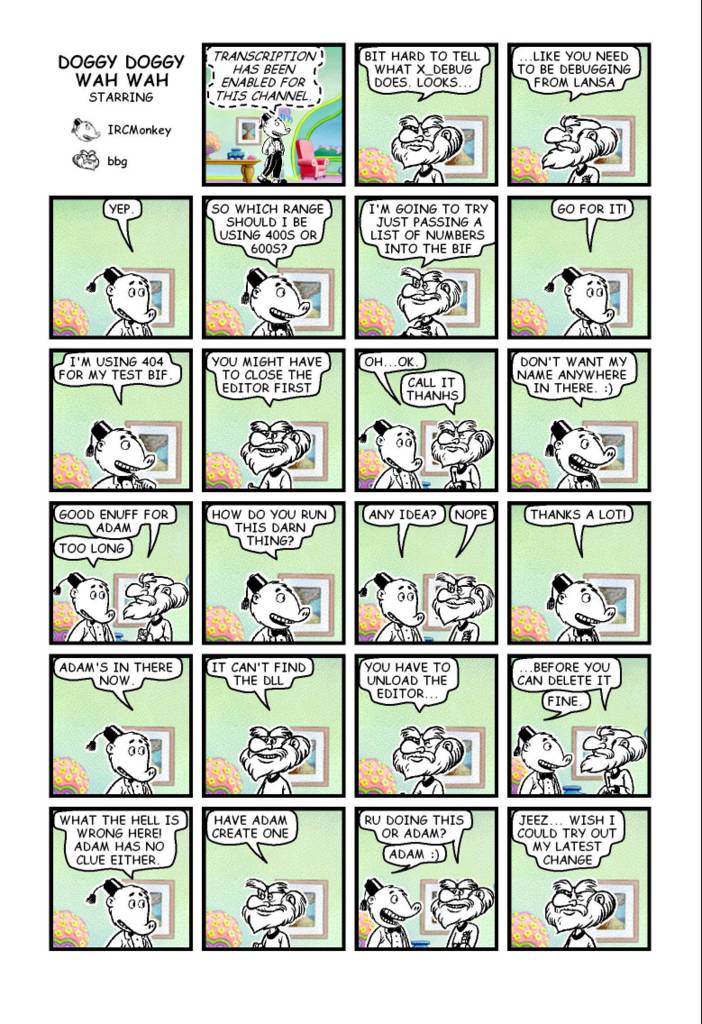
Karora Komics

Just stumbled onto these on my old hard drive, thought it might be fun to post, just to show you how whacky Karora's R&D team can be. The next few comic strips are an actual debugging session that took place on 27-11-2002, with comic characters bbg as Gav in the Toronto lab, and IRCMonkey as yours truly, working remotely from home. We kind of took eXtreme Programming to the extreme.

Thinking of the tsunami victims

Well, no matter where you are in the world, unless you've been hibernating off some remote mountains or islands in the last 4 days, you must have heard about the latest tsunami disaster that hit South East Asia last Sunday, causing untold devastation.

It is at times like this that I feel so very fortunate to be living in such peaceful and (relatively) trouble-free country as Canada. I feel so undeservedly blessed in this life, as there are certainly thousands of people who are much more deserving than me. And I thank God for granting me these blessings. At times like this, for a brief moment, it makes me want to give up everything and devote my life to helping the less fortunate. Sadly, the selfish side of me is still winning the struggle against that thought.

But for now, a small contribution, I can do. The Canadian Red Cross has set up a page, South East Asia Tidal wave and Earthquake, that accepts online donation. In the spirit of the season, please help what you can. Be sure to select South East Asia Tidal wave and Earthquake as the Fund Designation if you really want your donation to go to the tsunami relief efforts.
God bless.

Not Designed for Dummies

With the holidays, and being away from home and the office (and still able to do work), I've been using my old Dell Inspiron laptop more extensively than I usually do, and I've come to notice how crappy the keyboard design is on this thing.

The Ctrl key is too hard. I'd do a Ctrl-S to save my code changes in the editor, and sometimes it would simply echo an 's' in the middle of my code (the Ctrl didn't take). I guess I didn't press hard enough.
Bad design point #1: the product encourages people to do the wrong things (pressing hard on the keyboard in the long run is a health hazard, or so I've heard).

The TouchPad mouse is another thing. It's positioned right below where your thumbs would be located if your hands were fully positioned on the keyboard. I'd be typing along and then all of a sudden, the cursor would jump half a page down, and I find myself hypertyping in the middle of another block of code. What happened? Oh, I guess one of my thumbs must have touched the TouchPad by accident, triggering a mouse click that puts the cursor somewhere else.
Bad design point #2: the product encourages people to do the wrong thing without even realizing they were doing it.

May be because it's just an ancient Dell, or may be it's my seating posture. But this experience reminds me of how critically important usability is to any product, computer related or otherwise. To be usable, the user interface needs to be intuitive. If I build a product that does something when my users expect it to do something else, then this is a very bad thing. It's most likely qualified as carnal rule #1 of usability design, because if this happens too often, eventually the annoyance factor kicks in and my users will be cursing me for using my product.

Upon reflection, this is more of a wake-up call for myself than anything, because I at times make this very mistake in designing software user interface. I guess I need to have that "Design for Dummies" logo engrained in my head. But then again, if you're building radically new things out-of-the-box that have never been done before, and especially if you don't have usability experts on staff at your disposal, then the only true test of usability would be to put out beta releases, and get as many users as possible to use it, then make the necessary adjustments based on their feedbacks.

PuTTY security holes in version < 0.56

A little bit of old news. I just saw this on the PuTTY site:

2004-10-26 ANOTHER SECURITY HOLE, fixed in PuTTY 0.56
PuTTY 0.56, released today, fixes a serious security hole which can allow a server to execute code of its choice on a PuTTY client connecting to it. In SSH2, the attack can be performed before host key verification, meaning that even if you trust the server you think you are connecting to, a different machine could be impersonating it and could launch the attack before you could tell the difference. We recommend everybody upgrade to 0.56 as soon as possible.

That's two really bad holes in three months. I'd like to apologise to all our users for the inconvenience.

This Day in History

On this date:

In 1783, George Washington resigned as commander-in-chief of the Army and retired to his home at Mount Vernon, Va.

In 1893, the Engelbert Humperdinck opera "Haensel und Gretel" was first performed, in Weimar, Germany.

In 1928, the National Broadcasting Company set up a permanent, coast-to-coast network.

In 1941, during World War II, American forces on Wake Island surrendered to the Japanese.

In 1948, former Japanese premier Hideki Tojo and six other Japanese war leaders were executed in Tokyo.

In 1968, 82 crew members of the U.S. intelligence ship "Pueblo" were released by North Korea (news - web sites), 11 months after they had been captured.

In 1972, Thanh Hai Tran was born.

In 1980, a state funeral was held in Moscow for former Premier Alexei N. Kosygin, who had died Dec. 18 at age 76.

In 1986, the experimental airplane "Voyager," piloted by Dick Rutan and Jeana Yeager, completed the first non-stop, non-refueled, round-the-world flight as it landed safely at Edwards Air Force Base in California.

In 1987, Lynette "Squeaky" Fromme, serving a life sentence for the attempted assassination of President Ford in 1975, escaped from the Alderson Federal Prison for Women in West Virginia. (She was recaptured two days later.)

In 1997, a jury in Denver convicted Terry Nichols of involuntary manslaughter and conspiracy for his role in the Oklahoma City bombing, declining to find him guilty of murder.

[Courtesy of Yahoo.com]

AppConnector search result by Google Posted by Hello

Karora's AppConnector finally ranked #1 by Google!

Up until recently, when you google for AppConnector, the first hit you'd get is one of our reseller's web site instead of Karora's web site. It's embarrassing, considering that we own the trademark for the name. Well, no longer. As of today, we're first in the hitlist. Woohoo!!!

Next mission: getting us to come up #1 for Desktop Application Integration. :-)

Oh pardon me, I farted...

This, hot off the Wire:

A Japanese firm pioneers a system to share fragrances over the internet.
...
Users attach a device to their laptops that resembles a crystal ball with a nozzle. The device receives aroma data from the central server and exudes fumes from the nozzle in accordance with that reading.

Wow! That's pretty revolutionary...if it can work, that is.

What's next: smellevision? Not as farfetched as you might think now, is it? Scary!

Developer versus Programmer

What's the difference between a (Software) Developer and a (Computer) Programmer? Joe Spolsky's had a good post this week on his Joel on Software blog discussing at length by comparing the difference between two Hebrew words...which are all Greek to me until he started explaining it in English. Joel also pointed to another good blog entry by Eric Sink, entitled Small ISVs: You need Developers, not Programmers, which makes a similar distinction. In effect, from a responsibilities perspective, they both say that a programmer is someone who does what's sufficient, no more, no less. And a developer is one who does what's necessary.

Although I appreciate and understand the need to make the distinction, I think the distinction is borne from a human resource or management perspective, not one of a technical perspective. The title Software Developer only started appearing in employment ads in recent years. Before that, back in the days where computer programmers are still a rare species, all the relevant titles you would see in a job posting are Programmer/Analyst, Application Programmer, System Programmer, or simply Programmer. And it is not unplausible to see the following responsibilities mentioned in the job description: responsible for writing functional specification, implementing programming logic as per specs, writing test cases to be executed by testers, perform bug fixes, may involve writing of user documentation, etc... My point is that back then a programmer was not necessarily someone who just does the coding, and good programmers didn't just do what they were told.

Back then when I went to my high school guidance counsellor to try to chart my career path, the brochure only had about a couple of career options for computers: Computer Programmer (meant for those interested in software) and Computer Engineer (meant for those interested in hardware).

Now, with the explosion of jobs created by the computer industry in the past few decades, suddenly there's a need to differentiate between a Developer and a Programmer. That's unfortunate, because to me they both mean the same thing. When I explain what I do to someone who's computer challenged, I'd say I'm a computer programmer, eventhough my job title says "Software Developer". They know, albeit acutely, what "computers" are, and I can easily explain away what "programmer" means. Instead, with a fancy term like "Software Developer", I'd have to explain the difference between software and hardware--a much more difficult thing to explain to someone with zero knowledge of computers.

The Evolution of a Programmer

Link: The Evolution of a Programmer

This article makes so much sense it's actually funny. I was laughing out loud towards the end of it. Here's my interpretation of it, for those who may be programmatically challenged:

High School/Jr.High
You learn the basic and the simple. BASIC is the first programming language you learn in high school.

First year in College
You learn to add standards and structures to things. Pascal is the language used in first year college classes to teach structured programming.

Senior year in College
You learn to do things the "smart" way. Lisp is the language used in senior year Artificial Intelligence (AI) courses.

New professional
Reality kicks in. You find out what you've been learning in college has nothing to do with what you'll be doing for a living. You're inexperienced and don't necessarily do things in the most efficient ways. C is the programming language used by just about every software development organization in the world, if not in full then at least in part.


Seasoned professional
With some experience, you think you now know alot of tricks. You think you can do things better than anyone else. Consequently, you always like to re-invent the wheel, to build better wheels. You know too much for your own good.
C++ is an object-oriented language preferred by organizations over C because it is easier to maintain. In this code snippet, the programmer is overriding virtually all the standard operators and functions provided by the language with his/her own implementation.

Master Programmer
You've mastered the art doing things in the most complicated way possible.

Hackers
You learn to tinker with things beyond your comprehension.

I dropped the various levels of hackers from the list because these aren't really the next steps in the evolution per se. Most programmers tend to pick up their hacking experience in parallel with their programming experience.

New Manager
Wisdom kicks in and you finally realize what you've learned in school actually makes sense. You've become humbled and now wants to keep things as basic and simple as possible.

Middle Manager
You learn that getting more things done means delegating as much as possible to other people.

Senior Manager
You learn to delegate with less effort. Or in programmer lingo: you've optimized your delegation routine.

Chief Executive
You've lost it! You've gone senile. Time to turn in the badge in exchange for that retirement pen.

Call me naive, but it seems to me that life as a programmmer is very much a parody of life in general.

Robosapien

Picked up this hot tip from Steve about Robosapien. Looks like it might be a cool gift for my nephew. The trouble is: I checked virtually all the online shops and they're all sold out! Thanks for the tip, Steve...not! Just wish you had posted it a month or two earlier. Oh well. There's always next year.

EBay Uses Snail-Mail to Hook New Users

Link: EBay Uses Snail-Mail to Hook New Users
I got one of these "snail mails" from eBay the other day. Good on them for doing their part to support the postal service.

I'll tell you this, with the advent of e-mails and private courier services, I was beginning to wonder when the Canadian Postal Service would close down their operation. :-) The quality of their delivery service lately leaves something to be desired. I'm speaking from personal experience. Ever since I moved into the new address a few years ago, I've noticed that they've misdelivered my mail more times than I can count. The first was their mail forwarding service. I specifically ticked the box on the form that said "Only forward if full name matches". Yet, they ended up forwarding every piece of mail intended for everyone of my family members. They had effectively forwarded based on Last Name match instead of Full Name match.

And then there's the thing where they would delivered my neighbours' mail to my mailbox: same street number, but next street down the block.

And then there was the time when I sent a payment cheque into my Internet Service Provider, located within the same city. Eight weeks later I called and the ISP still hadn't received my cheque. I guess I could have used registered mail, but at the time I had too much good faith in regular mail. My mistake I guess.

So I don't know...I want to help them improve their service, but I've made numerous complaints that really didn't get anywhere. So I just gave up.

You'd think I'm being over-dramatic, but I'm telling you, if their service doesn't straighten up their delivery service over the next few years, I wouldn't be surprised if Canada Post closes down or gets privatized. ;-)

The health benefit of blogging

Did you know that Blogger has this cool feature where you look at a blogger's profile, each of the blogger's attributes is a clickable link that takes you to all the other people in the bloggersphere that have similar characteristics? I was bored enough last night to be clicking through my own profile just to see how many others have the same messed up interests as I do. From this little experiment, I've formulated a hypothesis as to why people blog: peace of mind.

Allow me to explain. Sometimes, people need to vent some cooped-up frustrations that otherwise can't be let out. So what more appropriate means to do it than a blog?

In the olden days people used to write diaries to help sort out their emotions, because writing forces them to think more analytically about what they're thinking and feeling, and helps them better come to terms with it.

Well, now in the twenty first century, people blog. With my brief perusing, I had encountered a variety of people, from a fourteen-year-old venting her teen angst using the spelling skills that I can never comprehend but people around her age could probably relate to very well, to a lazy ass housewife who complains about being too lonely because her husband works too much, to a highly intelligent professional--with a theoretical reasoning ability that's way beyond my comprehension--trying to get his thoughts out to the world before it disappears forever from his brain. And all these people have the same interests as I do? Scary!

For the fourteen-year-old trying to get her grounding in this crazy world, it could keep her from going berzerk due to those teenage hormonal imbalances (Of course, I'm exaggerating...to prove a point). For a lonely housewife, she might be able to get comments from other fellow bloggers to help solve her boredom crisis, God help her. For an open minded professional, he could be opening up avenues for theoretical debates with people all over the world, people whom he's never even met, intellectual challenges that otherwise would not be possible.

Me, I'm not sure which category of bloggers I belong to--perhaps a little bit of each (except for the lonely housewife bit). But it feels good to get ideas out in the open, eventhough you're not sure if anyone will ever read them, and those who do will probably think your thoughts are idiotic. But don't give a damn! It's a free world, and it's your God-given right of free will, to be totally entitled to your idiotic thoughts, so don't you let anything or anyone stop you from expressing them freely. :-) Just kidding about the "idiotic thoughts" part.

So go on, my friend. If your life is a little messed up and your emotion a little unstable, instead of going to a psychiatrist, I suggest you start a blog. It's a lot cheaper and will probably work just as well.

Signed,
Your blogiatrist :)

Firefox humour

Have you seen this? It's quite funny. I like number 11:
GetOffYourLazyButtAndWalkToTheFrontDoorForPetesSake 0.01 - Snail mail notifier

SpamAssassin kills spam dead on its track!

Got the new spam filter for our Microsoft Exchange server up and running in the office network for a few weeks now, and I'm totally thrilled as to how well it works straight out-of-the-box, so to speak. SpamAssassin is another testament to the power of free and open source software development.

There are a couple of available SpamAssassin plugins for Exchange Server, but I used Christoper Lewis'
Exchange SpamAssassin SMTP Sink
(Thanks, Christopher!) since it worked best for me. Initiallly, I installed SpamAssassin on the same server as the Exchange Server, but soon found that Perl's performance on Windows platform was really bad. Some of our incoming emails eventually arrived at their recipient's inbox six, eight hours late. So I switched to running it (spamd) on a Linux server, and then made the Exchange sink connect remotely to the SpamAssassin daemon. It seems sort of counter-intuitive, doesn't it, when you first think about it, but the performance is much, much better this way. Perl likes being run on Linux better than on Windows.

So far, the spam filter has caught about 99% of the spams that have come through our server. That's an acceptable success rate--And no false positives, unlike the spam filter that we've tried previously. The installation was relatively straight-forward, a credit to the documentation. I also like the fact that in addition to the usual DNS black list lookup approach, which other typical spam filters use, SpamAssassin's Bayesian filter weeds out spam contents quite well. That's smart stuff! And that's with me barely scratching the surface of functionalities after a couple of days of playing with it, without training the filter whatsoever.

Who would have thought ten, fifteen years ago that spam e-mails would become such a big problem to our corporate netizens. They are a complete waste of bandwidth, not to mention a waste of every body's time spent in deleting them. But thanks to great open source tools like SpamAssassin, coupled with strong legislation from our law makers, we'll soon put an end to this net parasite yet.

Skype me

I've been playing around with Skype for about a week or so. It's a nifty telephony app that let's you have voice conversation with other Skype members (free service), and even lets you make phone calls to regular phone numbers (paid service).
The voice quality is extremely good; I've tried other similar apps before like Net2Phone a while back and the quality was really crappy. Not Skype. You do need a microphone headset to use this thing; otherwise, your calling partner will hear weird feedback echos of their own voice.

So go ahead. Give it a try, and once you've got yourself an ID, skype me. :-)

Hello again, world!

Hello!
Just emigrated from Bloglines. Trying out this new blogging home to see if it's better or worse.
First impression: I've got to say I like the WYSIWYG editing interface. Support for comments is also a plus. Not too crazy about the look-and-feel, though, but I guess it takes some getting-used-to.

I'm sorry, but what exactly is a "portal"?

So my boss sneaked up behind me today, as usual, while I was updating our "portal" web site, saw the huge "Welcome to our portal site" banner on the front page and said "Hey! Don't call it a portal; it's not!" Huh? Slightly stunned by the revelation, I switched over to Google and popped in the "define:portal" search expression, and low and behold, almost all of the Google definitions consistently define it as "a web site that is or is intended to be the first place people see when using the web. Typically, a portal site has a catalog of web sites, a search engine, or both. A portal site also may offer e-mail and other service to entice people to use that site as their main 'point of entry' (hence "portal" to the web)" [source].
WisdomPortal site also has a good list of definitions.


Well, slap me silly! I always thought it the other way around, that a portal would be an access point for the outside world, our customers, to reach into us, into our corporate information. What the heck?

Hypotheses
Either
1. I've dozed off in the past six years and am now technically clueless, or
2. the meaning of a "portal" has changed (read: evolved).

Proof
I took a chance that the former wasn't the case, and set out to prove the latter to myself. After some serious digging, I came upon this really good Portals 101 article that explained it all. The article quoted a more satisfactory definition to my taste: Portal is a term, generally synonymous with gateway, for a World Wide Web (WWW) site that is or proposes to be a major starting site for users when they get connected to the Web or that users tend to visit as an anchor site.
Ah hah! It is "synonymous with a gateway", not necessarily an Internet gateway, and as such, can function in both directions: inbound and outbound.

Apparently, there are different types/classes of portals:


  1. Corporate or Enterprise (B2E) portals, (examples: corporate intranets)
  2. eBusiness (B2B and B2C) portals (examples: mySAP, oraclesmallbusiness.com)
  3. Personal (WAP) portals (examples: WebTV, OnStar), and
  4. Public (Internet) portals (examples: Yahoo, Google, MSN)

So by the above definition, since the purpose of our company's portal site is to provide personalized service to our customers, it would fall under Type 2 (a B2C portal). So it IS a portal! It IS a portal! I'm not crazy after all. I'm not crazy after all!!! HAHAHA [klunk] [falling off soap box]

[climbing back on soap box]
Ergo, I've proven that both of my hypotheses are true! Hypothesis 2 is true because although the original general definitions are correct, there are specialized classifications of the general term, as seen above. And hypothesis 1 is also true; I must have dozed off a bit, because the "B2C Portal" concept has been in existence since at least 1999, if not earlier (read: "Critical Issues: The B2C Phenomenon", December 1999, PricewaterhouseCoopers LLP).


(Originally posted on: bloglines.com.)